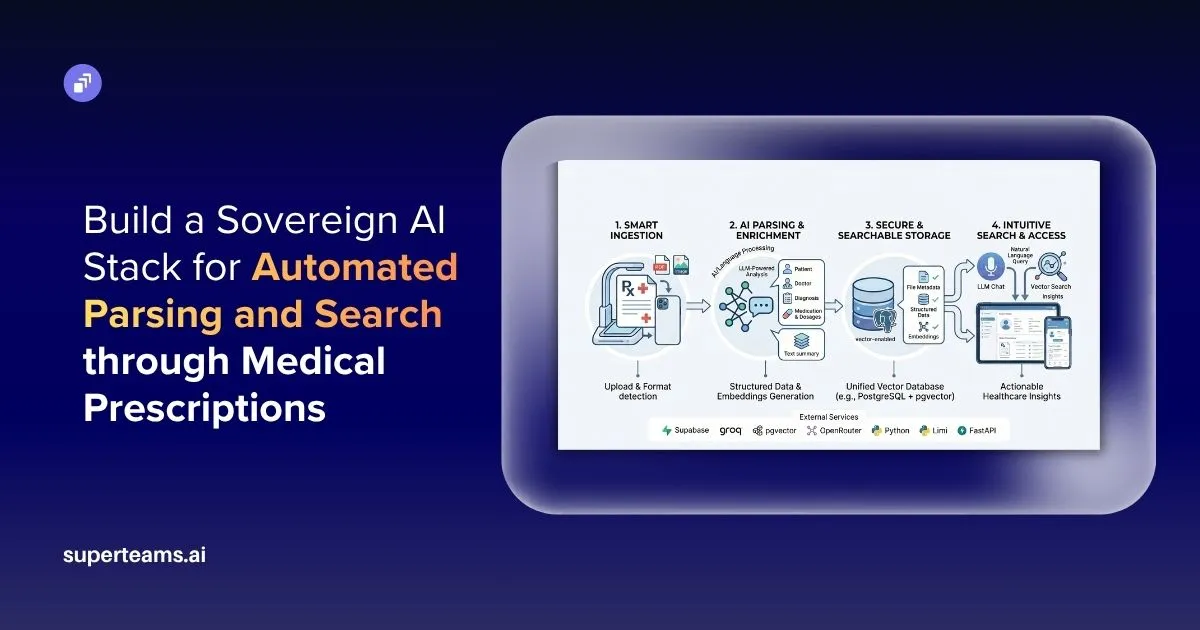
Medical prescriptions still remain one of the most difficult healthcare records to digitize and search effectively. Hospitals, clinics, and pharmacies still rely heavily on handwritten notes, scanned PDFs, mobile images, and inconsistent prescription formats, making automated understanding extremely challenging. Traditional OCR systems can extract text, but they often struggle to understand medical meaning, dosage instructions, abbreviations, and doctor-specific shorthand commonly found in prescriptions.
In this project we build a sovereign AI-powered medical prescription parsing and search system that transforms unstructured prescription documents into structured, searchable medical records. Instead of relying solely on OCR or proprietary AI APIs, this system uses PyMuPDF, PaddleOCR, PostgreSQL, open-source LLMs for medical entity extraction and structured storage and semantic retrieval.
System Architecture
The system architecture used in this project follows a modular pipeline designed to transform unstructured medical prescriptions into structured and searchable medical records. As prescriptions may arrive as scanned PDFs, handwritten images, or digitally generated files, this architecture combines document processing, OCR, open-source LLMs, and relational storage to ensure reliable medical extraction.
End-to-End Pipeline
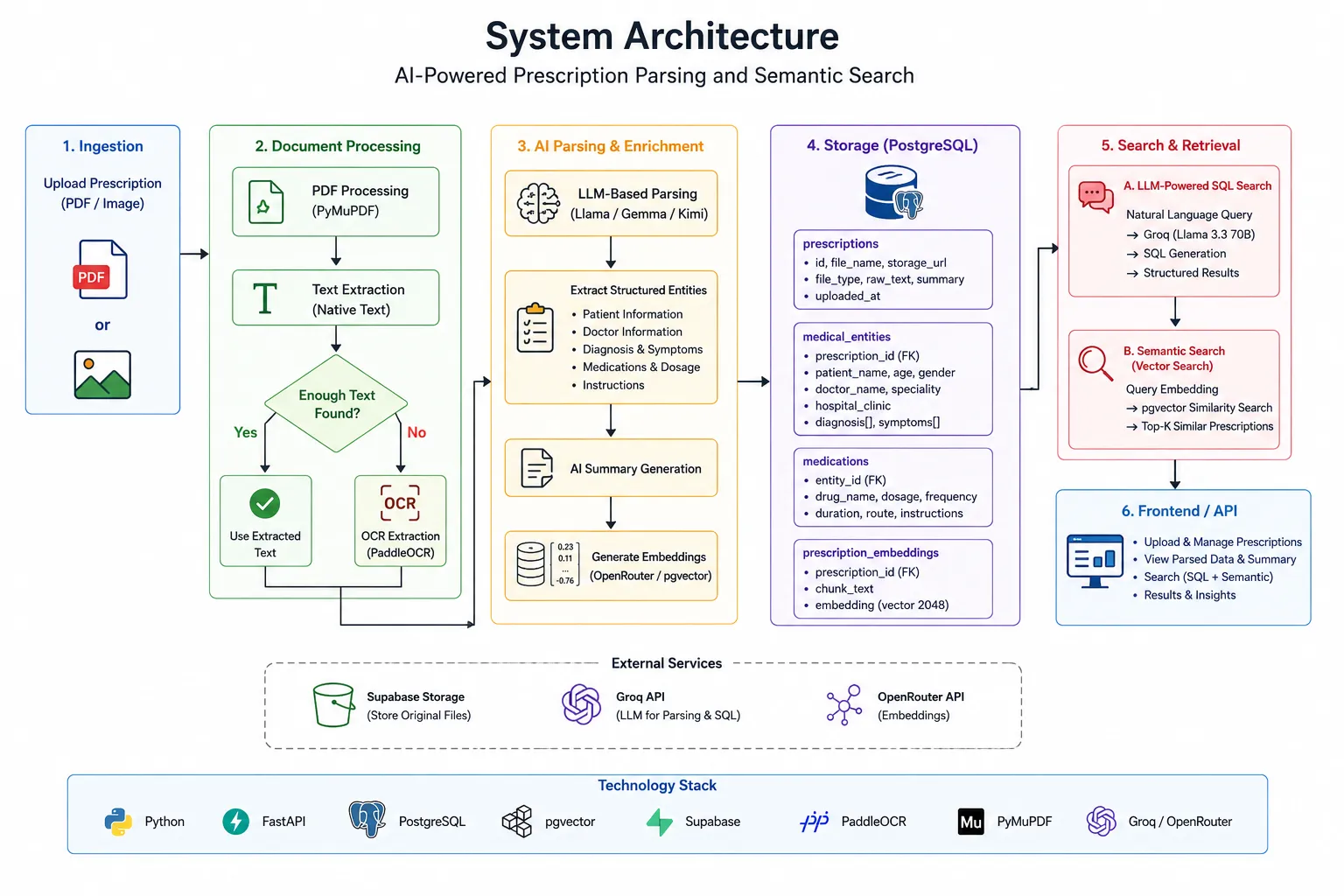
1. Prescription Upload
Users can upload prescription PDFs or images through the application interface, which supports handwritten prescriptions, scanned medical records, and digitally generated hospital-issued documents.
2. Secure File Storage
Uploaded prescriptions are then securely stored in Firebase or Supabase Storage, ensuring original medical files remain available for auditability, future reprocessing, and reliable document retrieval.
3. Document Processing with PyMuPDF
The system now determines whether a prescription contains embedded selectable text or is image-based; if native text exists, PyMuPDF extracts it directly while preserving layout context, improving extraction accuracy, and avoiding unnecessary OCR processing.
4. OCR for Scanned Prescriptions
Scanned or handwritten prescriptions are then processed using PaddleOCR, which extracts raw medical text while handling difficult handwriting, low-quality scans, medical abbreviations, and multilingual prescription content commonly found in healthcare settings.
5. LLM-Based Prescription Parsing
The extracted prescription text is then processed using open-source models such as Kimi K2, Gemma, or Llama via Groq, transforming noisy OCR output into structured medical information including medicines, dosage, diagnoses, prescribed tests, and treatment instructions.
6. PostgreSQL Storage
Structured prescription information is then stored inside PostgreSQL alongside OCR text, metadata, document references, and parsed medical entities, supporting efficient querying, historical tracking, and analytics across patient records.
7. AI Summaries and Embeddings
Prescription summaries and vector embeddings are then generated for improving readability and semantic understanding, helping the system retrieve medically relevant prescriptions even when exact medicine names are not explicitly searched.
8. Deep Medical Search
Users can now perform intelligent search across prescriptions using pgvector, supporting semantic medical queries such as recurring infections, repeated antibiotic prescriptions, or similar treatment histories.
Instead of treating prescriptions as static documents, our system converts them into structured medical intelligence that can be queried, summarized, and searched semantically where each component remains independently scalable and replaceable, making the architecture suitable for both experimentation and production-scale healthcare systems.
1. Setting Up File Storage with Supabase
Medical prescriptions are sensitive healthcare documents that must be stored securely while remaining accessible for OCR, parsing, and future reprocessing. In this project, Supabase Storage is used to manage prescription PDFs and images, while PostgreSQL stores metadata such as storage paths, processing status, and extracted medical information. This separation keeps file storage independent from downstream AI workflows and improves scalability.
Why Supabase Storage?
Supabase Storage works well for prescription parsing systems because it provides:
- Secure storage for PDFs and prescription images
- Easy retrieval for OCR and parsing workflows
- Signed URLs for temporary access to sensitive documents
- Scalable object storage for growing prescription datasets
- Seamless integration with PostgreSQL metadata
Uploading Prescription Files
The project uses a dedicated upload_file() utility to upload prescriptions into Supabase Storage. The function automatically generates a unique filename using UUIDs, detects the file type, assigns the correct content type, and stores the document inside the prescriptions folder.
def upload_file(local_path: str, destination_folder: str = "prescriptions") -> dict:

   _ensure_bucket()
   client = _get_client()

   file_name = os.path.basename(local_path)
   unique_name = f"{uuid.uuid4().hex}_{file_name}"
   storage_path = f"{destination_folder}/{unique_name}"

   # Detect content type
   ext = os.path.splitext(file_name)[1].lower()
   content_type_map = {
       ".pdf": "application/pdf",
       ".png": "image/png",
       ".jpg": "image/jpeg",
       ".jpeg": "image/jpeg",
       ".tiff": "image/tiff",
       ".bmp": "image/bmp",
       ".webp": "image/webp",
   }
   content_type = content_type_map.get(ext, "application/octet-stream")

   with open(local_path, "rb") as f:
       client.storage.from_(SUPABASE_BUCKET).upload(
           path=storage_path,
           file=f,
           file_options={"content-type": content_type},
       )

   public_url = client.storage.from_(SUPABASE_BUCKET).get_public_url(storage_path)

   return {
       "storage_path": storage_path,
       "public_url": public_url,
       "file_name": file_name,
       "file_type": "pdf" if ext == ".pdf" else "image",
   }
Downloading Prescription Files
The download_file() utility is used to retrieve prescription documents from Supabase Storage and saves them locally. This is useful when OCR or processing workers require local access to the uploaded file before extraction begins.
def download_file(storage_path: str, local_dest: str) -> str:

   client = _get_client()
   data = client.storage.from_(SUPABASE_BUCKET).download(storage_path)
   with open(local_dest, "wb") as f:
       f.write(data)
   return local_dest
Generating Signed URLs
This project uses get_signed_url() to generate temporary URLs for controlled document access which expire automatically after a configurable duration, reducing unnecessary exposure of medical files.
def get_signed_url(storage_path: str, expiry_seconds: int = 86400) -> str:
   """Generate a signed URL for temporary access (default 24h)."""
   client = _get_client()
   result = client.storage.from_(SUPABASE_BUCKET).create_signed_url(
       storage_path, expiry_seconds
   )
   return result["signedURL"]
By separating file upload, retrieval, and secure access into dedicated utilities, the storage layer remains reusable, secure, and production-ready for medical prescription workflows.
2. Extracting Text from Prescriptions Using PyMuPDF
Medical prescriptions often arrive in different formats, including digitally generated PDFs, scanned hospital records, and handwritten prescriptions embedded inside documents. Before OCR is applied, the system first attempts to extract native text directly from PDFs to preserve formatting and improve accuracy. In this project, PyMuPDF is used to extract embedded text and images from prescriptions, while OCR acts as a fallback when scanned documents are detected.
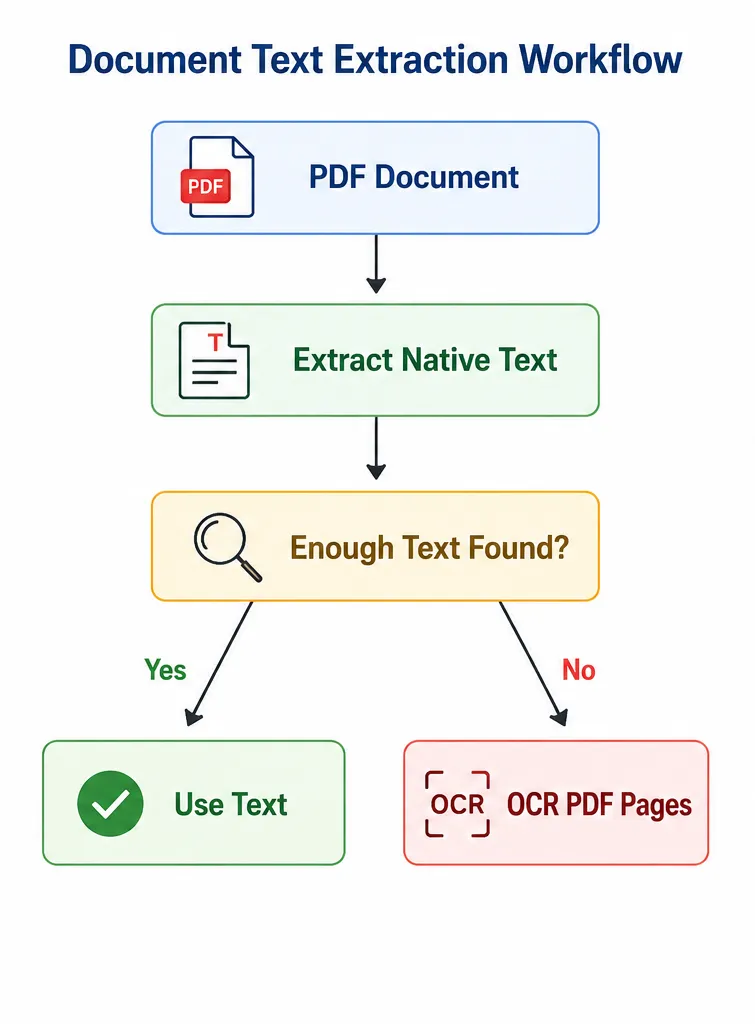
Detecting Text-Based vs Scanned PDFs
The extraction workflow begins by determining whether a PDF already contains meaningful embedded text. If the extracted text is too short (less than 50 characters), the document is treated as scanned and passed through OCR. This hybrid approach reduces unnecessary OCR calls and improves extraction reliability for digitally generated prescriptions.
Extracting Native Text and Embedded Images
The extract_text_from_pdf() utility uses PyMuPDF to extract text page by page while identifying embedded images inside the document. Extracting embedded images becomes particularly useful for prescriptions containing handwritten annotations, signatures, or stamped medical notes, returning the full extracted text, per-page text, and extracted image paths for downstream OCR processing.
def extract_text_from_pdf(pdf_path: str) -> dict:

   doc = fitz.open(pdf_path)
   page_texts: list[str] = []
   images: list[dict] = []
   tmp_dir = tempfile.mkdtemp(prefix="rx_images_")

   for page_num in range(len(doc)):
       page = doc[page_num]

       # --- Text ---
       page_text = page.get_text("text")
       page_texts.append(page_text)

       # --- Embedded images ---
       image_list = page.get_images(full=True)
       for img_idx, img_info in enumerate(image_list):
           xref = img_info[0]
           base_image = doc.extract_image(xref)
           img_bytes = base_image["image"]
           img_ext = base_image["ext"]
           img_path = os.path.join(tmp_dir, f"page{page_num}_img{img_idx}.{img_ext}")
           with open(img_path, "wb") as f:
               f.write(img_bytes)
           images.append({"page": page_num, "image_path": img_path})

   doc.close()

   full_text = "\n\n".join(page_texts)
   return {"text": full_text, "page_texts": page_texts, "images": images}
OCR for Handwritten and Scanned Prescription Images
Many medical prescriptions are scanned documents or handwritten notes where embedded PDF text is either missing or unusable. To handle these cases, the project uses PaddleOCR because it performs well on low-quality scans, handwritten content, medical abbreviations, and multilingual prescription text. Instead of relying solely on native PDF extraction, OCR acts as a fallback mechanism to recover medical information from image-based prescriptions.
The ocr_image() utility runs PaddleOCR on a prescription image and returns the concatenated recognized text. This function is later used for scanned PDF pages as well as embedded prescription images extracted from documents.
def ocr_image(image_path: str) -> str:
   engine = _get_ocr_engine()
   results = engine.ocr(image_path)

   lines: list[str] = []
   if results and results[0]:
       for line in results[0]:
           if isinstance(line, dict):
               lines.append(line.get("text", "") or line.get("rec_text", ""))
           else:
               text = line[1][0]  # (text, confidence)
               lines.append(text)

   return "\n".join(lines)
Unified Prescription Processing Workflow
Rather than handling PDFs and images separately throughout the application, the project introduces a unified extraction entry point using extract_from_file(). The function first extracts native text using PyMuPDF, falls back to OCR for scanned PDFs, and additionally performs OCR on embedded images to capture handwritten notes that may otherwise be missed, while returning the combined extracted text, OCR outputs, and file source type.
def extract_from_file(file_path: str) -> dict:

   ext = os.path.splitext(file_path)[1].lower()

   if ext == ".pdf":
       result = extract_text_from_pdf(file_path)
       main_text = result["text"].strip()

       ocr_texts: list[str] = []

       if len(main_text) < 50:
           doc = fitz.open(file_path)
           for page_num in range(len(doc)):
               page = doc[page_num]
               pix = page.get_pixmap(dpi=300)
               img_bytes = pix.tobytes("png")
               page_ocr = ocr_image_bytes(img_bytes)
               ocr_texts.append(page_ocr)
           doc.close()
           main_text = "\n\n".join(ocr_texts) if ocr_texts else main_text

       for img_info in result["images"]:
           img_ocr = ocr_image(img_info["image_path"])
           if img_ocr.strip():
               ocr_texts.append(img_ocr)

       combined = main_text
       if ocr_texts:
           combined = main_text + "\n\n--- OCR from images ---\n\n" + "\n\n".join(ocr_texts)

       return {"text": combined, "ocr_texts": ocr_texts, "source": "pdf"}

   else:
       ocr_text = ocr_image(file_path)
       return {"text": ocr_text, "ocr_texts": [ocr_text], "source": "image"}
By combining native text extraction, scanned page rendering, and embedded image handling into a single workflow, the system improves robustness across different prescription formats while preserving medical information that may otherwise be lost during processing.
3. Parsing Prescriptions Using an LLM
To store the extracted prescription text in a structured format, the system first needs to parse noisy OCR output into meaningful medical entities. Since prescriptions often contain inconsistent formatting, abbreviated medicine names, and unstructured instructions, this project uses an LLM-based parsing pipeline to parse extracted text into structured information such as medicines, dosage, symptoms, diagnoses, doctor details, and patient information.
Why Use an LLM Instead of Rule-Based Extraction?
Traditional regex-based extraction struggles with prescription variability because doctors rarely follow a fixed format and medicines are often written using abbreviations or shorthand. By using an LLM-based parser, the system can better interpret noisy OCR output, normalize medicine names, extract dosage instructions, and handle incomplete medical information more reliably than rule-based approaches.
Defining Structured Medical Extraction Tools
We can use the Groq tool for calling the LLM to return structured medical entities instead of free-form text. The store_prescription_entities tool defines the schema the model must follow, including patient details, diagnoses, symptoms, and prescribed medications.
TOOLS = [
   {
       "type": "function",
       "function": {
           "name": "store_prescription_entities",
           "description": (
               "Store parsed medical entities extracted from a prescription. "
               "Call this once you have extracted all information from the text."
           ),
           "parameters": {
               "type": "object",
               "properties": {
                   "patient_name": {
                       "type": ["string", "null"],
                       "description": "Full name of the patient",
                   },
                   "patient_age": {
                       "type": ["string", "null"],
                       "description": "Age of the patient (e.g. '45 years')",
                   },
                   "patient_gender": {
                       "type": ["string", "null"],
                       "description": "Gender of the patient",
                   },
                   "doctor_name": {
                       "type": ["string", "null"],
                       "description": "Name of the prescribing doctor",
                   },
                   "doctor_speciality": {
                       "type": ["string", "null"],
                       "description": "Speciality/department of the doctor",
                   },
                   "hospital_clinic": {
                       "type": ["string", "null"],
                       "description": "Hospital or clinic name",
                   },
                   "diagnosis": {
                       "type": ["array", "null"],
                       "items": {"type": "string"},
                       "description": "List of diagnoses mentioned",
                   },
                   "symptoms": {
                       "type": ["array", "null"],
                       "items": {"type": "string"},
                       "description": "List of symptoms mentioned",
                   },
                   "medications": {
                       "type": "array",
                       "description": "List of prescribed medications",
                       "items": {
                           "type": "object",
                           "properties": {
                               "drug_name": {
                                   "type": "string",
                                   "description": "Name of the drug/medication",
                               },
                               "dosage": {
                                   "type": ["string", "null"],
                                   "description": "Dosage (e.g. '500mg')",
                               },
                               "frequency": {
                                   "type": ["string", "null"],
                                   "description": "How often (e.g. 'twice daily')",
                               },
                               "duration": {
                                   "type": ["string", "null"],
                                   "description": "Duration (e.g. '7 days')",
                               },
                               "route": {
                                   "type": ["string", "null"],
                                   "description": "Route of administration (e.g. 'oral', 'IV')",
                               },
                               "instructions": {
                                   "type": ["string", "null"],
                                   "description": "Special instructions (e.g. 'after meals')",
                               },
                           },
                           "required": ["drug_name"],
                       },
                   },
               },
               "required": ["medications"],
           },
       },
   }
]
Building a Schema-Aware System Prompt
To improve extraction accuracy, the parser dynamically introspects the PostgreSQL schema and injects it into the system prompt. This gives the LLM awareness of the actual database structure before parsing begins.
def _build_system_prompt() -> str:
   """
   Build system prompt that includes the live PostgreSQL schema
   so the LLM knows exactly what columns/types to fill.
   """
   schema_info = introspect_schema()

   return f"""You are a medical prescription parser. Your job is to extract structured medical information from prescription text.

## Database Schema (PostgreSQL)
The extracted data will be stored in the following tables. Align your output precisely with these columns:

{schema_info}

## Instructions
1. Read the prescription text carefully.
2. Extract ALL medical entities: patient info, doctor info, diagnoses, symptoms, and medications.
3. Call the `store_prescription_entities` tool with the extracted data.
4. If a field is not present in the text, omit it or use null.
5. For medications, extract every prescribed drug with as much detail as available.
6. Be precise -- do not hallucinate information not present in the text."""
This approach helps the model produce outputs that align closely with the downstream PostgreSQL tables and reduces inconsistencies during database insertion.
Parsing Prescription Text with Groq
We use the parse_prescription() function that sends extracted OCR text into Groq along with the schema-aware system prompt and tool definitions. The LLM then returns structured prescription entities through function calling.
def parse_prescription(raw_text: str) -> dict:
   system_prompt = _build_system_prompt()

   messages = [
       {"role": "system", "content": system_prompt},
       {
           "role": "user",
           "content": f"Parse the following prescription text and call the store_prescription_entities tool:\n\n---\n{raw_text}\n---",
       },
   ]

   response = client.chat.completions.create(
       model=GROQ_MODEL,
       messages=messages,
       tools=TOOLS,
       tool_choice={"type": "function", "function": {"name": "store_prescription_entities"}},
       temperature=0.0,
       max_tokens=4096,
   )

   message = response.choices[0].message

   if message.tool_calls:
       tool_call = message.tool_calls[0]
       parsed = json.loads(tool_call.function.arguments)
       return parsed

   if message.content:
       try:
           return json.loads(message.content)
       except json.JSONDecodeError:
           pass

   return {"error": "Failed to parse prescription", "raw_response": message.content}
4. Designing PostgreSQL for AI-Ready Medical Search
After prescription text has been parsed into structured medical entities, the next step is storing it in a way that supports both traditional database queries and AI-powered retrieval.
In this project, we use PostgreSQL as the central storage layer for prescription metadata, extracted entities, medications, summaries, and vector embeddings, while pgvector powers semantic search across medical records. Instead of storing only raw OCR text, the system combines relational storage with embeddings to support both structured filtering and meaning-based retrieval.
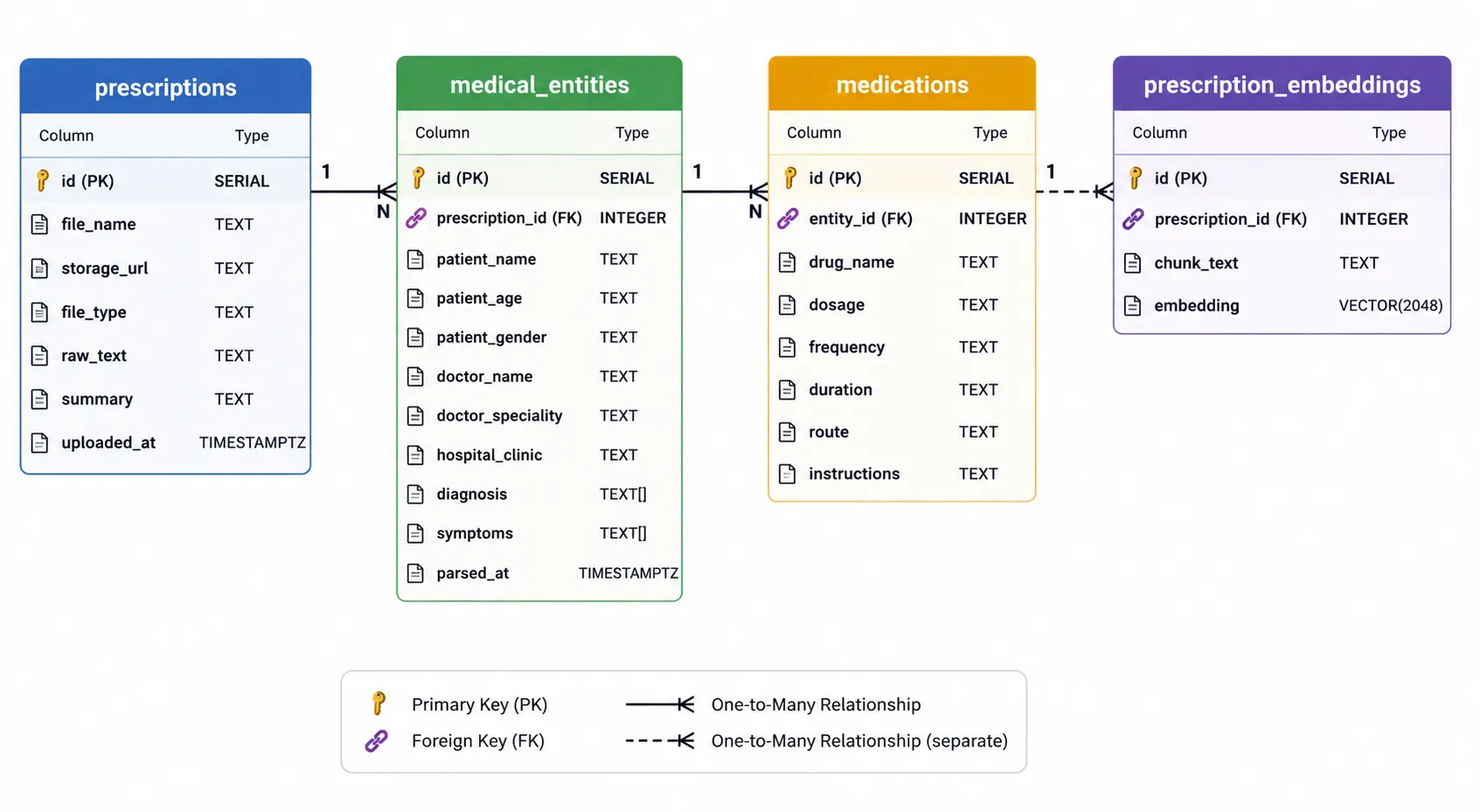
Database Schema Design
The database is organized into multiple tables to separate prescription metadata, extracted medical entities, medications, and semantic embeddings.
prescriptions table
Stores core prescription metadata including uploaded file details, raw extracted text, generated summaries, and upload timestamps.
medical_entities table
Stores parsed patient information, doctor details, diagnoses, symptoms, and hospital metadata extracted by the LLM.
medications table
Stores individual medicines prescribed within a prescription along with dosage, frequency, duration, administration route, and special instructions.
prescription_embeddings table
Stores vector embeddings generated from prescription summaries for semantic medical search.
5. Generating AI Summaries
Reading raw prescription text repeatedly can be difficult, especially for scanned or handwritten documents. To simplify retrieval and understanding, the project automatically generates concise prescription summaries using OpenRouter-based LLM completions.
The generate_summary() function retrieves raw prescription text, constructs a summarization prompt, and generates a short medical summary covering patient details, diagnoses, medications, dosage, and instructions.
CREATE OR REPLACE FUNCTION public.generate_summary(row_id INT)
RETURNS VOID AS $$
DECLARE
   rx_record RECORD;
   prompt TEXT;
   summary_text TEXT;
BEGIN
   SELECT * INTO rx_record
   FROM prescriptions
   WHERE id = row_id;

   IF rx_record.raw_text IS NULL OR rx_record.raw_text = '' THEN
       RETURN;
   END IF;

   prompt := 'Summarize the following prescription text in 3-5 sentences covering: '
          || 'patient info, diagnosis, key medications with dosages, and special instructions. '
          || 'Do not use markdown. Prescription text: ' || rx_record.raw_text;

   SELECT openrouter_complete(
       current_setting('ai.openrouter_complete_model'),
       jsonb_build_array(
           jsonb_build_object('role', 'user', 'content', prompt)
       )
   ) INTO summary_text;

   UPDATE prescriptions
   SET summary = summary_text
   WHERE id = row_id;
END;
$$ LANGUAGE plpgsql;
Generating Vector Embeddings
Once a summary is generated, the system automatically creates embeddings using OpenRouter embedding models. Instead of embedding raw OCR text directly, the project embeds summarized prescription content to improve retrieval quality and reduce unnecessary noise.
The generate_embedding() function creates embeddings and stores them inside the prescription_embeddings table.
CREATE OR REPLACE FUNCTION public.generate_embedding(row_id INT)
RETURNS VOID AS $$
DECLARE
   rx_record RECORD;
BEGIN
   SELECT * INTO rx_record
   FROM prescriptions
   WHERE id = row_id;

   IF rx_record.summary IS NULL OR rx_record.summary = '' THEN
       RETURN;
   END IF;

   DELETE FROM prescription_embeddings WHERE prescription_id = row_id;

   INSERT INTO prescription_embeddings (prescription_id, chunk_text, embedding)
   VALUES (
       row_id,
       rx_record.summary,
       openrouter_embed(current_setting('ai.openrouter_embed_model'), rx_record.summary)
   );
END;
$$ LANGUAGE plpgsql;
Automatic Trigger-Based Workflow
Rather than manually generating summaries and embeddings after every prescription upload, PostgreSQL triggers automate the entire workflow. Once a new prescription is inserted, a summary is automatically generated, and whenever the summary changes, a fresh embedding is created.
CREATE OR REPLACE FUNCTION public.trigger_generate_summary()
RETURNS TRIGGER AS $$
BEGIN
   BEGIN
       PERFORM generate_summary(NEW.id);
   EXCEPTION WHEN OTHERS THEN
       RAISE NOTICE 'generate_summary failed for id %: %', NEW.id, SQLERRM;
   END;
   RETURN NEW;
END;
$$ LANGUAGE plpgsql;

DROP TRIGGER IF EXISTS after_insert_generate_summary ON prescriptions;
CREATE TRIGGER after_insert_generate_summary
AFTER INSERT ON prescriptions
FOR EACH ROW
EXECUTE FUNCTION trigger_generate_summary();

CREATE OR REPLACE FUNCTION public.trigger_generate_embedding()
RETURNS TRIGGER AS $$
BEGIN
   IF NEW.summary IS NOT NULL AND NEW.summary != ''
      AND (OLD.summary IS NULL OR OLD.summary != NEW.summary) THEN
       BEGIN
           PERFORM generate_embedding(NEW.id);
       EXCEPTION WHEN OTHERS THEN
           RAISE NOTICE 'generate_embedding failed for id %: %', NEW.id, SQLERRM;
       END;
   END IF;
   RETURN NEW;
END;
$$ LANGUAGE plpgsql;

DROP TRIGGER IF EXISTS after_update_generate_embedding ON prescriptions;
CREATE TRIGGER after_update_generate_embedding
AFTER UPDATE OF summary ON prescriptions
FOR EACH ROW
EXECUTE FUNCTION trigger_generate_embedding();
This trigger-based architecture reduces application complexity and keeps the AI enrichment pipeline directly inside PostgreSQL, making prescription ingestion simpler and more production-ready.
6. Deep Search Across Prescriptions
Traditional prescription search is often limited to exact keyword matching, which makes retrieval difficult when medicine names, diagnoses, or medical terminology vary across prescriptions. Searching for phrases such as “medicines for recurring fever” or “patients prescribed antibiotics repeatedly” becomes difficult when the exact wording does not exist in the database.
To address this, we can combine LLM-generated SQL search with vector-based semantic retrieval, allowing both structured medical filtering and meaning-based search across prescriptions.
LLM-Powered Natural Language Search
Instead of requiring users to write SQL manually, this system can convert natural language medical queries into SQL using Llama 3.3 70B via Groq. The model dynamically receives the PostgreSQL schema through introspection and generates SQL queries aligned with the actual database structure.
For example, queries such as:
- Find patients on metformin
- Show prescriptions involving respiratory infection
- Find patients prescribed antibiotics repeatedly
are converted into structured SQL queries spanning prescriptions, medical_entities, and medications.
def semantic_search_query(user_query: str) -> str:

   schema_info = introspect_schema()

   messages = [
       {
           "role": "system",
           "content": f"""You are a SQL query builder for a medical prescriptions database.

## Database Schema
{schema_info}

## Instructions
Given a natural language query, produce a SQL query that searches across the prescriptions,
medical_entities, and medications tables.
Return ONLY the full SQL SELECT query, nothing else.
- Use ILIKE for plain text columns (e.g. patient_name, drug_name, doctor_name).
- For array columns (diagnosis, symptoms -- type _text), use:
 EXISTS (SELECT 1 FROM unnest(me.diagnosis) d WHERE d ILIKE '%value%')
 Never apply ILIKE directly to an array column.
Always join the tables properly using foreign keys.
Limit results to 20 rows.""",
       },
       {"role": "user", "content": user_query},
   ]

   response = client.chat.completions.create(
       model=GROQ_MODEL,
       messages=messages,
       temperature=0.0,
       max_tokens=1024,
   )

   return response.choices[0].message.content.strip()
Semantic Search with Embeddings
To improve searches, this system also performs vector search using pgvector embeddings, where both prescription summaries and search queries are converted into embeddings and compared using cosine similarity.
For example, a query like “medicines for recurring fever” allows retrieval of prescriptions mentioning antibiotics or fever treatment even when the exact phrase does not exist.
def semantic_search(query: str, top_k: int = 10) -> list[dict]:
   """
   Semantic (vector) search: embed the query, then find closest prescription
   summaries by cosine distance.
   """
   with get_connection() as conn:
       with conn.cursor(cursor_factory=psycopg2.extras.RealDictCursor) as cur:
           cur.execute(
               """
               SELECT
                   pe.prescription_id,
                   p.file_name,
                   p.summary,
                   me.patient_name,
                   me.doctor_name,
                   me.diagnosis,
                   1 - (pe.embedding <=> openrouter_embed(%s, %s)) AS similarity
               FROM prescription_embeddings pe
               JOIN prescriptions p ON p.id = pe.prescription_id
               LEFT JOIN medical_entities me ON me.prescription_id = p.id
               ORDER BY pe.embedding <=> openrouter_embed(%s, %s)
               LIMIT %s;
               """,
               (EMBED_MODEL, query, EMBED_MODEL, query, top_k),
           )
           return [dict(row) for row in cur.fetchall()]
Conclusion
By following this guide, you can build a complete sovereign AI stack for medical prescription parsing and search capable of transforming unstructured prescription documents into structured, queryable medical intelligence. Instead of relying on traditional OCR-only workflows, this system combines document extraction, OCR, open-source LLMs, PostgreSQL, and vector search to create an end-to-end medical retrieval pipeline.
Key System Capabilities
The completed system is capable of:
- Extracting information from scanned prescriptions and handwritten medical documents.
- Parsing medicines, diagnosis, dosage, symptoms, and patient information using open-source LLMs.
- Storing structured medical information inside PostgreSQL for long-term retrieval.
- Generating concise AI summaries for faster understanding of prescriptions.
- Performing deep semantic search across prescriptions using pgvector embeddings.
- Supporting natural language medical search through LLM-generated SQL queries.
The complete code, along with setup instructions and implementation details, is available on GitHub: Vanshgarg-dev/Medical-Prescription-Parsing-Search
At Superteams, we help you build AI agents customized to your business needs. To learn more, speak to us.

-Feature-Image.CjBFdO7y_Z1bTNvg.webp)