You are driving through the highway at night. The rain starts picking up and you’re not sure if it’s going to get worse. Your phone is in your pocket. Looking at it is not an option. So you just talk.
“ARIA, is it going to rain in Hyderabad tonight?”
A calm voice comes back through the speakers: “Rain looks likely in Hyderabad today — up to 62% chance. The temperature ranges between 22 and 27 degrees.”
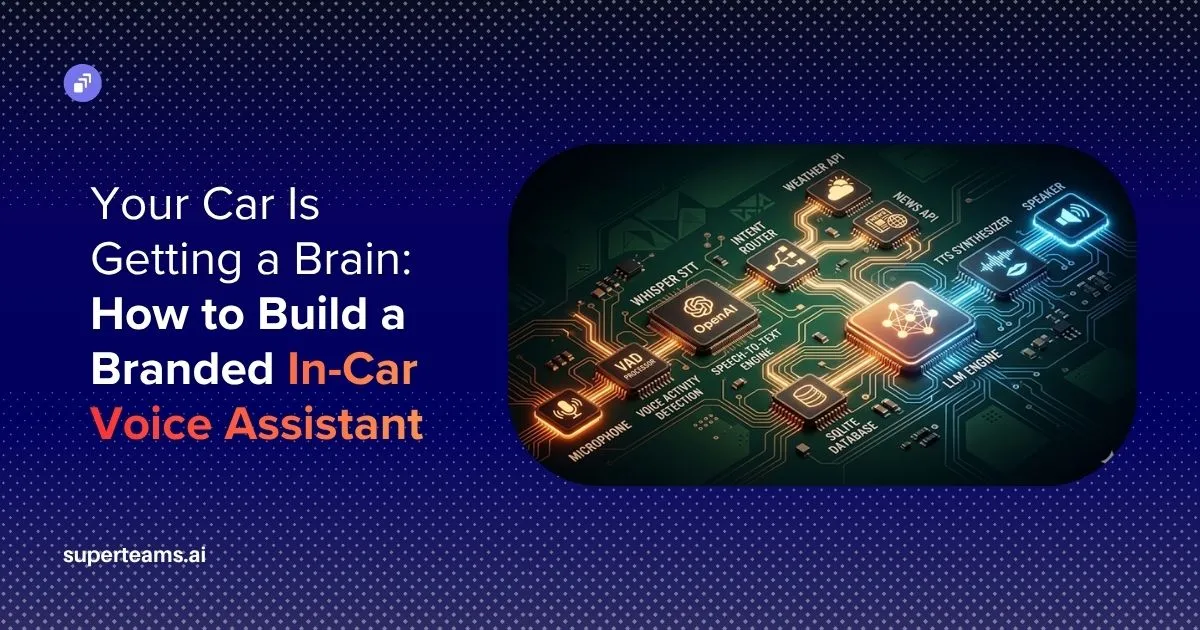
This is not a product from a big tech company. It is something you can build yourself, running on a laptop or a Raspberry Pi tucked behind your dashboard. This article walks through every piece of that system — from the microphone capturing your voice to the speaker playing the reply — using a real, working codebase called ARIA (Advanced Road Intelligence Assistant).
By the time you finish reading, you’ll understand how each component works, why it’s built the way it is, and how to set it up yourself.
Why This Is Worth Building Right Now
Voice assistants have been around for over a decade, but they’ve always had the same problem: they are built for phones, not for cars. Siri and Google Assistant are designed around screen interaction. They show you lists, maps, cards. None of that is useful when you are driving.
Two things changed in the last couple of years that make a genuinely good in-car assistant possible.
First, large language models became fast and cheap enough to use in real time. A model like GPT-4o-mini can respond in under a second and costs fractions of a cent per query. Second, neural text-to-speech got good enough such that the voice no longer sounds robotic, and streaming synthesis cut the delay between a response being generated and the first word being spoken from four seconds down to about one.
Put those two things together and you get something that actually feels natural to talk to while driving.
The Architecture: How the Pieces Fit Together
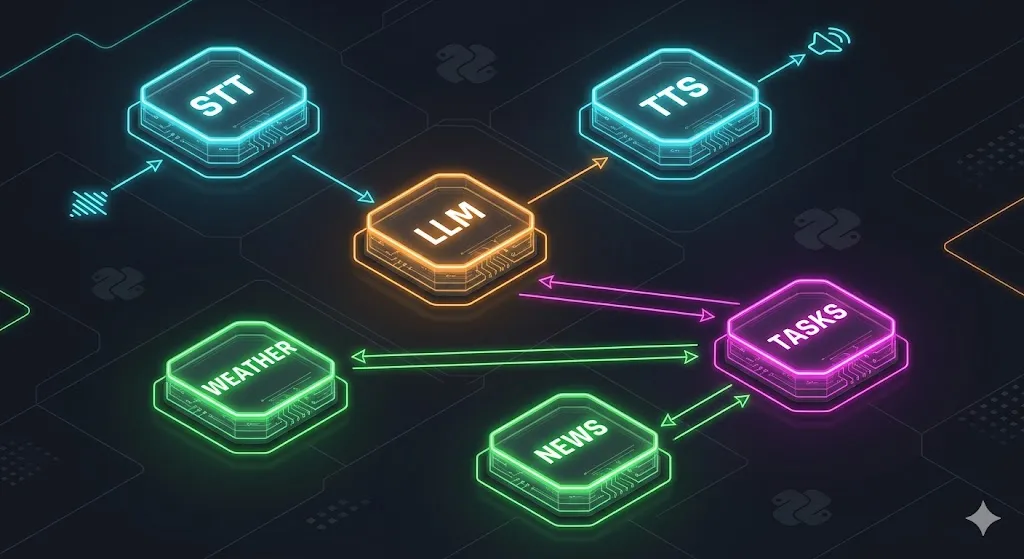
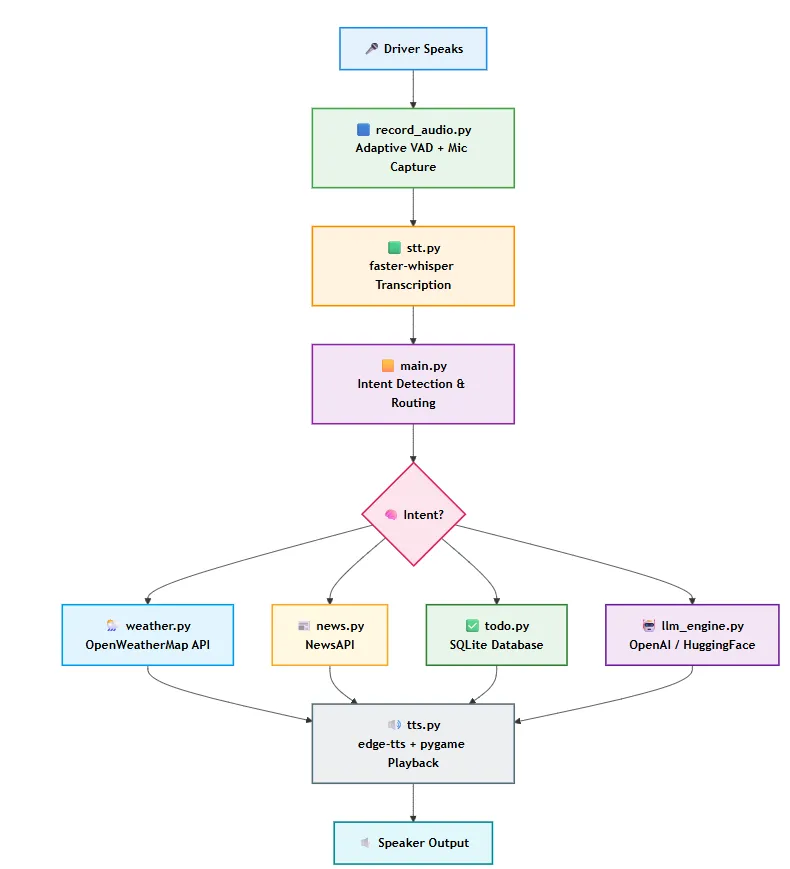
Before going file by file, it helps to see how data flows through the system.
Each module has a single job. The microphone feeds into transcription; transcription feeds into intent detection; intent detection routes to the right skill; and the skill’s response is spoken back. You can swap out any layer without touching the others.
config.py — The Central Settings File
Everything that might need to change lives here. API keys, audio parameters, file paths, model names — all pulled from a .env file at start-up using python-dotenv.
_ENV_PATH = Path(__file__).resolve().parent.parent / ".env"
load_dotenv(dotenv_path=_ENV_PATH, override=False)

OPENAI_API_KEY: str = os.getenv("OPENAI_API_KEY", "")
OPENAI_MODEL: str = os.getenv("OPENAI_MODEL", "gpt-4o-mini")
DEFAULT_CITY: str = os.getenv("DEFAULT_CITY", "Hyderabad")
WHISPER_MODEL: str = os.getenv("WHISPER_MODEL", "base")
The path resolution is deliberate. It uses __file__ to find the project root regardless of where you launch the script from. So whether you run python main.py from the project folder or from somewhere else, the .env is always found correctly.
The audio constants are worth understanding:
SAMPLE_RATE: int = 16_000
CHUNK_SIZE: int = 1024
MAX_WAIT_SECONDS: float = 7.0
MAX_RECORD_SECONDS: float = 14.0
SILENCE_HANGOVER: float = 0.9
MIN_SPEECH_SECONDS: float = 0.35
CALIBRATION_SECONDS: float = 0.75
SILENCE_HANGOVER is how long after your voice drops below the threshold before recording stops. 0.9 seconds is enough to handle a natural mid-sentence pause without cutting you off. MIN_SPEECH_SECONDS prevents noise spikes from being treated as speech — a real utterance needs to last at least 350 milliseconds.
The TTS voices are listed in priority order:
TTS_VOICES: list[str] = [
    "en-IN-NeerjaNeural",
    "en-US-JennyNeural",
    "en-GB-SoniaNeural",
]
If the first voice fails for any reason, the system falls through to the next. For an Indian driver, the en-IN-NeerjaNeural voice sounds noticeably more natural than the American or British alternatives.

record_audio.py — Listening Without Getting It Wrong
This is the piece most voice assistant tutorials skip over. They say “record from the microphone” and move on. But recording in a car is actually hard. There is road noise, traffic noise, engine noise, wind, and sometimes music in the background.
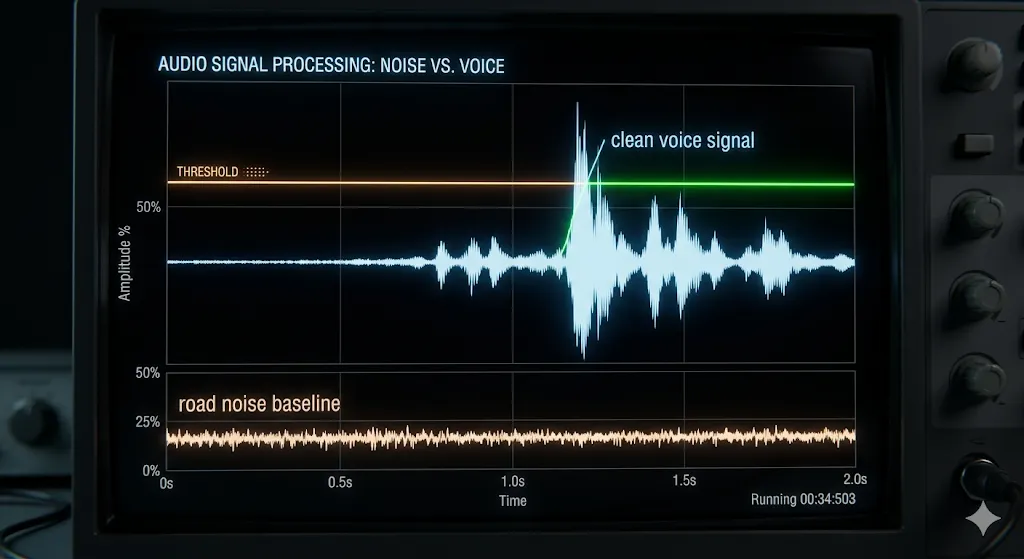
A naive recording system handles this noise problem in one of two ways, and both cause problems. The first approach is to record continuously — capture everything and let the speech-to-text model sort it out. That works, but it means Whisper is constantly processing road noise, fan hum, and radio bleed, which wastes compute and produces garbage transcriptions. The second approach is to use a fixed volume threshold — only start recording when the audio gets loud enough. That solves the noise problem but creates a new one: by the time the volume crosses the threshold and recording begins, the first syllable of your word has already passed. You said “Hyderabad” but the system only caught “derabad”. The word is clipped before the recorder is even turned on.
ARIA solves this with adaptive voice activity detection — a system that does not use a fixed threshold at all, but instead measures the current noise level and sets the threshold relative to it, recalibrating every time you speak.
Noise Floor Calibration
Before listening to your voice, the system records 0.75 seconds of ambient sound and measures its RMS (root mean square — essentially the average volume level):
calibration = sd.rec(
    int(CALIBRATION_SECONDS * SAMPLE_RATE),
    samplerate=SAMPLE_RATE,
    channels=1,
    dtype="float32",
    device=device,
)
sd.wait()
noise_rms = float(np.sqrt(np.mean(calibration ** 2)))
_LAST_NOISE_RMS = max(noise_rms, 0.0014)
thr_start, thr_cont = _voice_thresholds(_LAST_NOISE_RMS)
From that noise measurement, it computes two thresholds:
def _voice_thresholds(noise_rms: float) -> tuple[float, float]:
    n = max(float(noise_rms), 0.003)
    start = min(n * 1.8, _ABS_START_MAX)
    start = max(start, 0.008)
    cont = min(n * 1.3, _ABS_CONT_MAX)
    cont = max(cont, 0.005)
    cont = min(cont, start * 0.85)
    return start, cont
The “start” threshold is set at 1.8 times the noise floor. Your voice needs to be 80% louder than the background before recording begins. The “continue” threshold is only 1.3 times the noise floor. Once you start talking, ARIA keeps recording even if your voice drops slightly. This hysteresis design — easier to stay in than to enter — is what prevents choppy recordings that cut off mid-sentence.
Both thresholds are capped with absolute maximums so that in an extremely loud environment, the thresholds do not climb so high that normal speech cannot trigger them.
The Pre-Roll Buffer
Here’s a detail that matters more than it seems. When the system detects that you have started speaking, you have already been speaking for a few audio chunks. Without a buffer, those first few milliseconds are lost.
pre_buffer: deque[np.ndarray] = deque(maxlen=_PRE_ROLL_CHUNKS)

if voice_now:
    speech_started = True
    frames.extend(list(pre_buffer))
    frames.append(chunk)
The pre-roll keeps the last four audio chunks in a rolling buffer. The moment the speech is confirmed, those chunks are prepended to the recording. The first syllable of your word is always captured.
Device Selection and Caching
On first run, ARIA probes every available microphone input by recording a short sample from each and measuring the noise level, then picks the quietest one:
for i, d in enumerate(devices):
    if d["max_input_channels"] < 1:
        continue
    try:
        cal = sd.rec(int(0.3 * SAMPLE_RATE), samplerate=SAMPLE_RATE,
                     channels=1, dtype="float32", device=i)
        sd.wait()
        rms = float(np.sqrt(np.mean(cal ** 2)))
        if rms < best_rms:
            best_rms = rms
            best_idx = i
    except Exception:
        continue
The result is saved to .device_cache.json so subsequent start-ups skip this step entirely. If you add a new USB microphone, delete the cache file and it will re-run the selection.
stt.py — Turning Sound into Words
ARIA uses faster-whisper for speech-to-text. It is an optimized version of OpenAI’s Whisper that runs locally with no network call required. The model is loaded lazily — only when the first audio comes in — so start-up stays fast:
def _get_model():
    global _model
    if _model is None:
        from faster_whisper import WhisperModel
        print(f"Loading Whisper model '{WHISPER_MODEL}' on {WHISPER_DEVICE}...")
        _model = WhisperModel(WHISPER_MODEL, device=WHISPER_DEVICE, compute_type="int8")
    return _model
The transcription call has several parameters tuned specifically for in-car use:
segments, _ = model.transcribe(
    audio_path,
    language="en",
    vad_filter=True,
    vad_parameters=dict(min_silence_duration_ms=300, threshold=0.50),
    no_speech_threshold=0.72,
    compression_ratio_threshold=2.6,
    condition_on_previous_text=False,
    beam_size=5,
)
condition_on_previous_text=False is one of the more important settings here. Without it, Whisper uses what it previously transcribed to guess what comes next. In a car, if a noise spike produces a false transcription, that garbage text then biases every subsequent segment. Turning it off makes each segment independent.
no_speech_threshold=0.72 means if Whisper is more than 72% confident that a segment contains no speech, it is discarded. The post-processing adds one more filter on top of that:
no_speech_prob = getattr(seg, "no_speech_prob", 0.0) or 0.0
if no_speech_prob > 0.82:
    continue
if any(ch.isalpha() for ch in text):
    chunks.append(text)
Two layers of noise rejection, because road noise is unpredictable and a single threshold is rarely enough.
main.py — The Brain of the Operation
This is the entry point and the coordinator. The main loop is simple: record audio, transcribe it, detect intent, dispatch to the right handler, speak the result.
while True:
    audio_path = record_audio()
    if not audio_path:
        continue

    query = speech_to_text(audio_path).strip().lower()

    if not query or not _is_meaningful(query):
        response = "I did not catch that. Please try again."
        speak(response)
        continue

    print(f"\nYou: {query}")
    intent, value = detect_intent(query)
The _is_meaningful check filters out transcription noise — anything with fewer than three alphabetic characters is treated as silence:
def _is_meaningful(query: str) -> bool:
    return sum(ch.isalpha() for ch in query) >= 3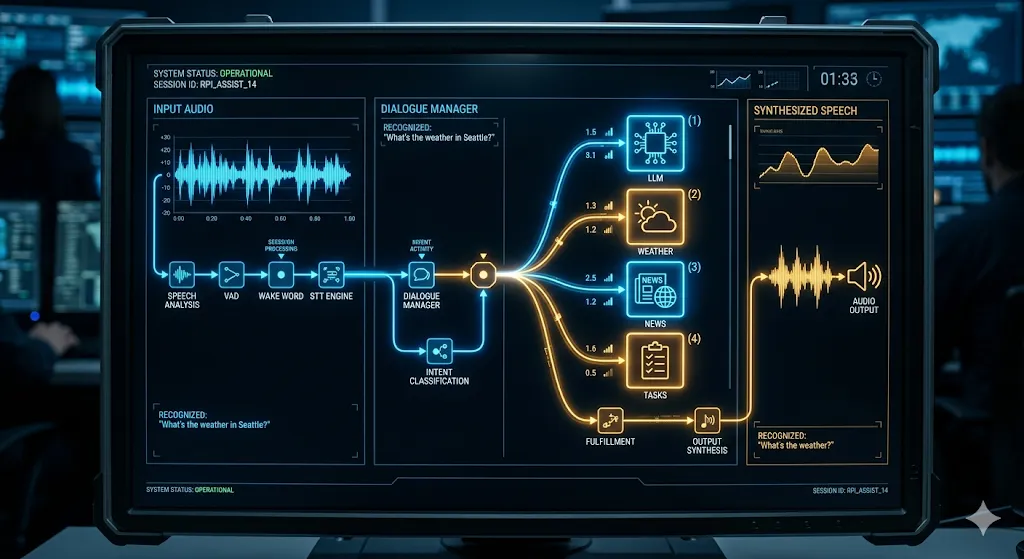
Intent Detection
Before routing anything to the LLM, ARIA runs a series of pattern matches to identify common queries. This is faster, cheaper, and more reliable than asking a language model to parse every utterance.
def detect_intent(query: str) -> tuple[str, str | None]:
    q = _normalise(query)

    if "weather in" in q:
        city = q.split("weather in", 1)[1].strip()
        return "weather", city or DEFAULT_CITY

    if "weather" in q:
        return "weather", DEFAULT_CITY

    has_rain_word = any(w in q for w in _STT_RAIN_ALTS)
    if has_rain_word:
        if "train" in q and not any(t in q for t in ("today", "tomorrow", " in ")):
            pass
        else:
            m = re.search(r"(?:rain|train)\s+in\s+([a-zA-Z\s-]+)", q)
            city = m.group(1).strip() if m else DEFAULT_CITY
            return "rain_today", city
Notice _STT_RAIN_ALTS = ("rain", "train"). Whisper frequently mishears “rain” as “train” in noisy environments because the two words sound nearly identical; both start with a consonant cluster and share the same vowel sound. So “will it rain today” can come out of Whisper as “will it train today”.
The challenge is that “train” is also a real word with a completely different meaning. If the driver says “what time does the train leave”, that should not be treated as a rain query. So the code needs a way to tell the two apart.
The reasoning is straightforward. Nobody asks about rain without some kind of time or place reference: “will it rain today”, “will it rain in Mumbai”, “will it rain tomorrow”. Words like “today”, “tomorrow”, and “in” almost always appear alongside a rain question. A genuine train question, on the other hand, sounds like “what time does the train leave” or “is the train running” — no time-of-day words, no city reference following it.
So when “train” appears with “today”, “tomorrow”, or “in” nearby, the code concludes it is almost certainly a mishearing of “rain” and routes it to the weather forecast. When “train” appears without any of those words, it lets it fall through as a real train question. It is not a perfect heuristic, but it handles the vast majority of real driving scenarios correctly.
The normalisation step handles common transcription quirks before matching:
_WEATHER_TYPOS = {
    "whether": "weather",
    "matter":  "weather",
    "wether":  "weather",
}

def _normalise(query: str) -> str:
    q = query.lower().strip()
    for typo, fix in _WEATHER_TYPOS.items():
        q = q.replace(typo + " in", fix + " in")
    q = q.replace("to-do", "todo").replace("to do", "todo")
    return q
Streaming LLM Responses
For anything that falls through intent detection, the query goes to the LLM. Rather than waiting for the full response and then speaking it, ARIA streams sentences to the TTS engine as they arrive:
print("Assistant: ", end="", flush=True)
full_parts: list[str] = []
for sentence in ask_llm_stream(query):
    print(sentence, end=" ", flush=True)
    full_parts.append(sentence)
    interrupted = speak(sentence, should_interrupt=detect_voice_interrupt)
    if interrupted:
        print("\n(Interrupted — listening...)")
        break
The driver hears the first sentence while the second is still being generated. This is the single biggest factor in making the assistant feel responsive rather than slow.
llm_engine.py — The Language Model Interface
This module handles all communication with the LLM, including streaming, conversation memory, and fallbacks.
The System Prompt
The system prompt is where ARIA’s personality lives. It is not an afterthought, it is the most carefully written piece of the whole project:
_SYSTEM_PROMPT = """You are ARIA — an Advanced Road Intelligence Assistant built into the car's dashboard.
You speak directly to the driver through the car speakers. Your voice is calm, warm, and confident — like a trusted co-pilot.

RESPONSE RULES (strictly follow every rule):
1. ALWAYS respond in plain spoken English — zero markdown, zero bullet points, zero numbered lists, zero URLs, zero code.
2. Keep every reply to 1-3 short, natural sentences. Never write a paragraph.
3. Each sentence must sound smooth when read aloud — use contractions (it's, you'll, I'd), avoid jargon.
4. Never start a sentence with "Certainly!", "Of course!", "Absolutely!" or similar hollow filler words.
5. Never suggest the driver look at a phone, screen, or read anything — they are driving.
...
SAFETY PRIORITY: If the driver seems distressed, immediately acknowledge their concern and keep the response under 1 sentence."""
Every rule exists because of a specific failure mode. Rule 1 prevents markdown that sounds nonsensical when read aloud. Rule 4 prevents the hollow filler that makes AI assistants feel fake. Rule 5 is a safety constraint — in a car, telling the driver to look at a screen is genuinely dangerous. The safety priority rule at the bottom kicks in if someone says something that sounds distressed, keeping the response short and focused on what matters.
Streaming Sentence by Sentence
The streaming implementation reads lines from the HTTP response and accumulates characters until a sentence boundary is hit:
buf = ""
for raw_line in resp.iter_lines():
    ...
    buf += delta
    while True:
        for sep in (".", "!", "?"):
            idx = buf.find(sep)
            if idx != -1:
                sentence = buf[: idx + 1].strip()
                buf = buf[idx + 1 :]
                if sentence:
                    yield sentence
                break
        else:
            break

if buf.strip():
    yield buf.strip()
The final if buf.strip() handles responses that end without punctuation. When the LLM finishes generating, the loop exits. But anything still sitting in buf that never hit a period, exclamation mark, or question mark would simply be lost — never yielded, never spoken. A response like “The capital of Australia is Canberra” would get cut to “The capital of Australia is” if the model did not add a period at the end, which happens more often than you would expect.
These two lines are the safety net. After the streaming loop ends, whatever is left in the buffer gets yielded as a final sentence regardless of whether it ends with punctuation. It is a small addition but without it, the last part of almost every LLM response would be silently dropped and the driver would hear answers that trail off without finishing their thought.
Conversation Memory
Memory is handled with a fixed-size deque that stores alternating user and assistant messages:
_history: deque[dict] = deque(maxlen=LLM_MAX_HISTORY * 2)

def _record(user_prompt: str, reply: str) -> None:
    _history.append({"role": "user", "content": user_prompt})
    _history.append({"role": "assistant", "content": reply})
LLM_MAX_HISTORY is 6, so the deque holds 12 entries: 6 turns of back-and-forth. When it fills, the oldest pair drops automatically. The entire history is prepended to every API call so the model has context without you needing to repeat yourself.
Fallback Chain
If OpenAI fails, the system tries HuggingFace’s Inference API. If that fails too, it falls back to hard-coded responses for the most common queries:
def _local_fallback(prompt: str) -> str:
    t = prompt.lower()
    if any(g in t for g in ("hello", "hi ", "hey")):
        return "Hey! I'm ARIA, your in-car assistant. What can I do for you?"
    if "how are you" in t:
        return "Running perfectly. What do you need?"
    if "what can you do" in t or t == "help":
        return "I can check weather, read you the news, manage your to-do list, and answer questions — all hands-free."
    return "I'm having trouble connecting right now. Try asking about weather, news, or your to-do list."
The assistant never crashes. Even with no internet and no API keys, it responds with something sensible.
weather.py — Real-Time Conditions and Forecasts
Two functions: one for current weather, one for rain probability. Both connect to the OpenWeatherMap API.
The city name cleaning is more careful than it might look:
_STOPWORDS = {"today", "tomorrow", "please", "now", "tonight", "too", "the"}

def _clean_city(raw: Optional[str], fallback: str = DEFAULT_CITY) -> str:
    if not raw:
        return fallback
    clean = re.sub(r"[^a-zA-Z\s-]", " ", raw).strip().lower()
    words = [w for w in clean.split() if w and w not in _STOPWORDS]
    if not words:
        return fallback
    return " ".join(words[:3]).title()
When the driver says “weather in Hyderabad today please”, Whisper transcribes it exactly as spoken. The intent detector splits on “weather in” and takes everything after it as the city name — giving “Hyderabad today please”. If that string went directly to the OpenWeatherMap API, it would return a 404 because no city called “Hyderabad Today Please” exists.
_clean_city fixes this before the API call is made. It splits the string word by word and removes anything in the stopword list — words like “today”, “tomorrow”, “please”, and “now” that a driver naturally says but that mean nothing to a weather API. What remains is just “Hyderabad”, properly capitalized and ready to send.
The stopword list is intentionally small. Words like “New”, “South”, and “North” are left out on purpose because they are part of real city names. The function only removes words that could never be part of a place name, so nothing meaningful gets stripped by accident.
The rain forecast scans all forecast slots for the current day and looks at multiple signals:
rain_flag = (
    ("rain" in it and it["rain"])
    or ("snow" in it and it["snow"])
    or main in {"rain", "drizzle", "thunderstorm"}
    or pop >= 0.4
)
pop is the probability of precipitation. Any slot with 40% or higher counts as a rain-likely slot. The final verdict is conservative by design:
likely = rain_slots >= 1 or max_pop >= 0.4 or "rain" in weather_mains

if likely:
    return f"Yes, rain is possible in {city} today — up to {pop_pct}% chance.{temp_part}"
return f"Rain looks unlikely in {city} today — only {pop_pct}% chance.{temp_part}"
If there is any reasonable chance of rain, ARIA informs the driver. It is better to carry an umbrella you did not need than the other way around.
news.py — Readable Headlines
NewsAPI returns headlines with the source appended: “India’s GDP grows 7.2% — The Hindu”. That suffix sounds odd when read aloud. A regex strips it down:
def _strip_source(title: str) -> str:
    return re.sub(r"\s*-\s*[^-]{2,40}$", "", title).strip()
The pattern [^-]{2,40} matches a source name between 2 and 40 characters that appears after the last dash: short enough to exclude content dashes within titles, long enough to catch most publication names.
The final output combines three headlines into a single spoken paragraph:
titles = [
    _strip_source(a["title"])
    for a in articles
    if a.get("title") and a["title"] != "[Removed]"
][:_MAX_HEADLINES]

joined = ". ".join(titles)
return f"Here are today's top headlines. {joined}."
Three headlines, no more. Anything longer and the driver has stopped absorbing information.
todo.py — A Task List That Survives a Power Cut
The to-do list uses SQLite with WAL (Write-Ahead Logging) mode:
@contextlib.contextmanager
def _db():
    conn = sqlite3.connect(str(DB_PATH))
    conn.execute("PRAGMA journal_mode=WAL")
    cur = conn.cursor()
    try:
        yield conn, cur
        conn.commit()
    finally:
        conn.close()
WAL mode means writes go to a separate log file first, then merge into the main database. If the car loses power mid-write, the database is not corrupted — the uncommitted transaction is simply never applied. A fresh connection is opened and closed on every call, which avoids the “database is locked” errors that happen with long-lived connections in multithreaded environments.
The schema setup also handles the case where someone already has an older version of the database:
cur.execute("PRAGMA table_info(todos)")
if "done" not in {row[1] for row in cur.fetchall()}:
    cur.execute("ALTER TABLE todos ADD COLUMN done INTEGER NOT NULL DEFAULT 0")
It checks the column names on every startup and adds any missing ones. The database upgrades itself without any manual intervention.
tts.py — Speaking with Low Latency
The TTS module synthesizes audio using Microsoft’s edge-tts library, which produces high-quality neural voices at no cost, and plays it through pygame.
Parallel Synthesis
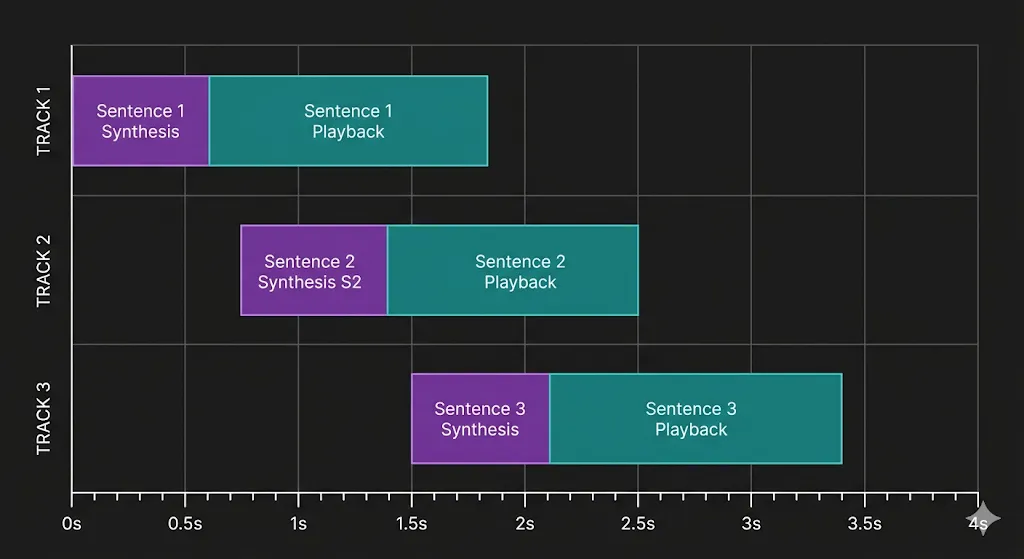
The key design decision is submitting all sentences to background threads simultaneously:
for i, sentence in enumerate(sentences):
    threading.Thread(
        target=_synth_one, args=(i, sentence, voice, result_q), daemon=True
    ).start()
While sentence 1 is playing, sentences 2 and 3 are being synthesized in parallel. By the time sentence 1 finishes, sentence 2 is usually already waiting. The gap between sentences drops from the synthesis time — around 400 milliseconds — to nearly zero.
The playback loop processes sentences in order, even if they arrive out of sequence:
pending: dict[int, str] = {}
next_play = 0

while next_play in pending:
    play_path = pending.pop(next_play)
    pygame.mixer.music.load(play_path)
    pygame.mixer.music.play()
    while pygame.mixer.music.get_busy():
        if should_interrupt and should_interrupt():
            pygame.mixer.music.stop()
            interrupted = True
            break
        time.sleep(0.04)
    next_play += 1
The pending dict holds finished sentences indexed by position. Playback only advances when the next sentence in sequence is ready, so even if sentence 3 finishes synthesizing before sentence 2, it waits.
Barge-In Detection
Every 40 milliseconds during playback, the system checks the microphone. If you start talking while ARIA is speaking, she stops immediately:
while pygame.mixer.music.get_busy():
    if should_interrupt and should_interrupt():
        pygame.mixer.music.stop()
        interrupted = True
        break
    time.sleep(0.04)
should_interrupt uses detect_voice_interrupt from record_audio.py. It takes a 200-millisecond mic sample and checks whether it exceeds the current noise threshold. If it does, playback stops immediately and the main loop returns to listening. This is what makes the voice assistant feel responsive and conversational instead of rigid and one-sided.
Temporary audio files are cleaned up after each sentence plays.
for p in paths_to_clean:
    try:
        os.remove(p)
    except OSError:
        pass
The OSError catch handles the case where the file was already removed or was never created due to a synthesis failure.
Practical Notes
Whisper model size matters. The base model gives good accuracy and runs in about one second on a modern laptop. On a Raspberry Pi 4, expect 3-4 seconds. Use the tiny model on hardware with less than 4GB RAM — accuracy drops slightly but it becomes usable.
The .env file is not optional. Without OPENAI_API_KEY, ARIA falls back to HuggingFace. Without that, it falls back to canned replies. Weather and news require their respective API keys regardless of what LLM you use. Both OpenWeatherMap and NewsAPI have generous free tiers.
The device cache can cause confusion. If you plug in a USB microphone after the first run, ARIA will still use the cached device. Delete .device_cache.json and restart to force re-detection.
VAD thresholds are calibrated for a stationary or low-speed environment. At highway speeds with windows open, road noise can push the noise floor high enough that the start threshold becomes hard to cross with normal speech. In that case, lower _ABS_START_MAX in record_audio.py from 0.065 to around 0.045.
What This Project Actually Demonstrates
Beyond the practical result, this is a working example of how to build ambient AI, or AI that is present and useful without demanding your attention.
The principles that make ARIA work in a car are the same ones that make any voice-first interface useful. Respond fast, which means streaming instead of waiting for complete responses. Know when to stop, which means enforcing a sentence limit in the system prompt at the source. Have a fallback for every failure mode, which means three layers of LLM options and local canned replies at the bottom. Respect the context, which means never asking a driver to look at a screen.
The components here — adaptive VAD, streaming LLM output, parallel TTS synthesis, intent routing before LLM calls — are patterns that show up in production voice systems at scale. ARIA packages them into something you can understand end to end, run on your own hardware, and extend in any direction you want.
Using NextNeural Voice AI Instead
Building a production-grade voice AI system involves far more than speech-to-text and LLM calls. You also need to handle latency, streaming audio, interruptions, telephony, orchestration, monitoring, failover, and scalability.
NextNeural.ai provides this infrastructure out of the box through real-time Voice AI APIs built for conversational systems.
Instead of stitching together Whisper, streaming LLMs, TTS, interruption handling, and telephony yourself, you can focus on the actual product experience — workflows, integrations, and conversational design.
The same architecture behind ARIA can scale from a local prototype into a production-ready in-car assistant, fleet copilot, support agent, or enterprise voice workflow system without rebuilding the stack from scratch.
Next Steps
This article is part of the growing library of real-world AI builds coming out of Superteams.ai, a community built around one idea: showcasing AI through actual business use-cases.
As a next step, you can explore the full project code, folder structure, and setup instructions on GitHub: github.com/AbhinayaPinreddy/In_car_AI_voice_assistant
At Superteams, we help you build AI agents customized to your business needs. To learn more, speak to us.
-Feature-Image.CjBFdO7y_Z1bTNvg.webp)