The Shift from Generic to Brand-Aware AI
There is a specific frustration that social media teams know well.
You open a new chat, paste in a prompt, and ask the model to write a LinkedIn post about your latest product launch. The output looks polished. The grammar is correct. The structure is professional.
And yet it is completely wrong.
The tone feels off. The brand story feels off too. The call to action sounds like it belongs to a different company in a different industry. You tweak the prompt and try again. The output changes, but the problem remains.
This is not a model quality problem.
It is a context problem.
A raw LLM prompt carries no institutional memory. The model has never read your brand guidelines. It does not know that your company avoids exclamation marks, that your flagship product is called Scribe rather than “the writing tool”, or that your brand voice is dry and precise rather than enthusiastic and punchy.
Every new prompt starts from zero. The model is guessing what your brand sounds like, and it is guessing based on every other company it has seen during training.
That guess is often good enough for a demo. It is rarely good enough for production.
Retrieval-Augmented Generation Fixes the Problem
Retrieval-Augmented Generation (RAG) fixes this problem at the architecture level.
Instead of hoping a prompt contains enough context, a RAG system retrieves relevant information before the model generates anything.
In the case of brand content, those sources might include:
- brand style guides
- product documentation
- campaign messaging
- past high-performing posts
- marketing playbooks
The language model no longer needs to guess what the brand sounds like. It writes using actual excerpts from the company’s documentation.
This simple shift changes the role of the model. Instead of inventing content from general knowledge, the model becomes a system that reads, interprets, and rewrites company knowledge into new formats. The result is dramatically more consistent output.
But getting there requires more than simply attaching a vector database to a prompt.
A production-ready pipeline needs several moving parts working together.
The Generation Pipeline at a Glance
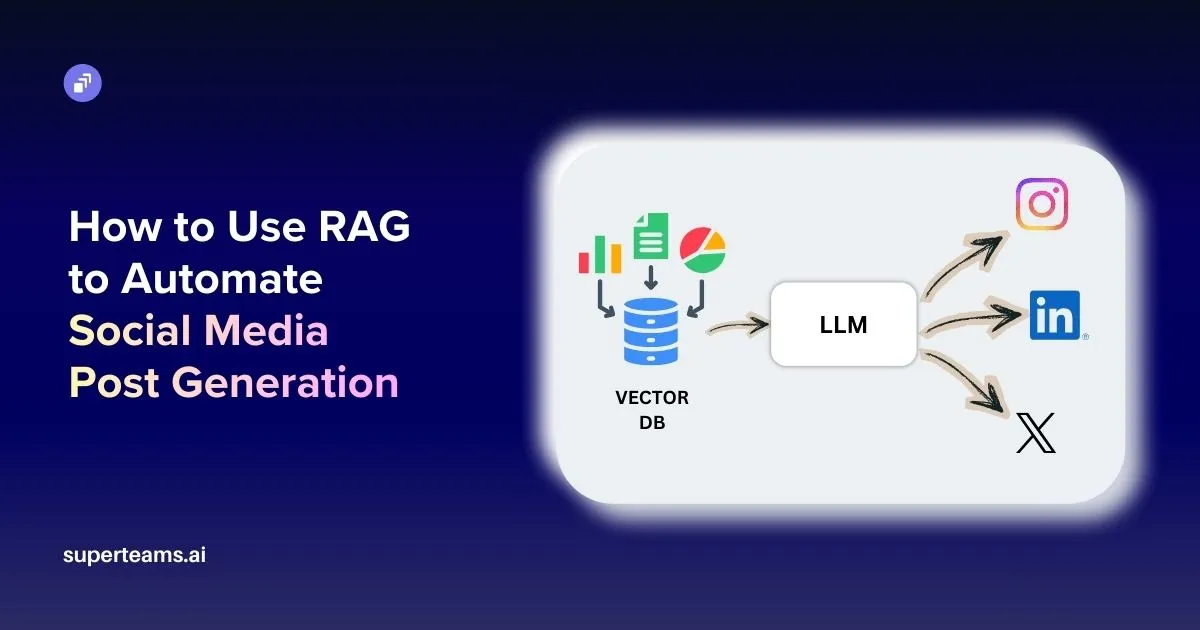
The system described in this article takes brand documentation as input and produces a fully rendered social media post as output.
At a high level, the pipeline looks like this:
- Brand assets are uploaded as PDFs or documents.
- The documents are parsed and converted into chunks.
- Each chunk is embedded and stored in a vector database.
- When a generation request arrives, the system retrieves the most relevant chunks.
- The retrieved context is inserted into a prompt.
- The language model generates a headline and caption.
- An image model generates a visual to accompany the post.
- The content is rendered into a final social media layout.
Each step has a specific responsibility. No single component is responsible for the entire process.
This separation turns what could be a fragile script into a system that is easier to debug, extend, and maintain.
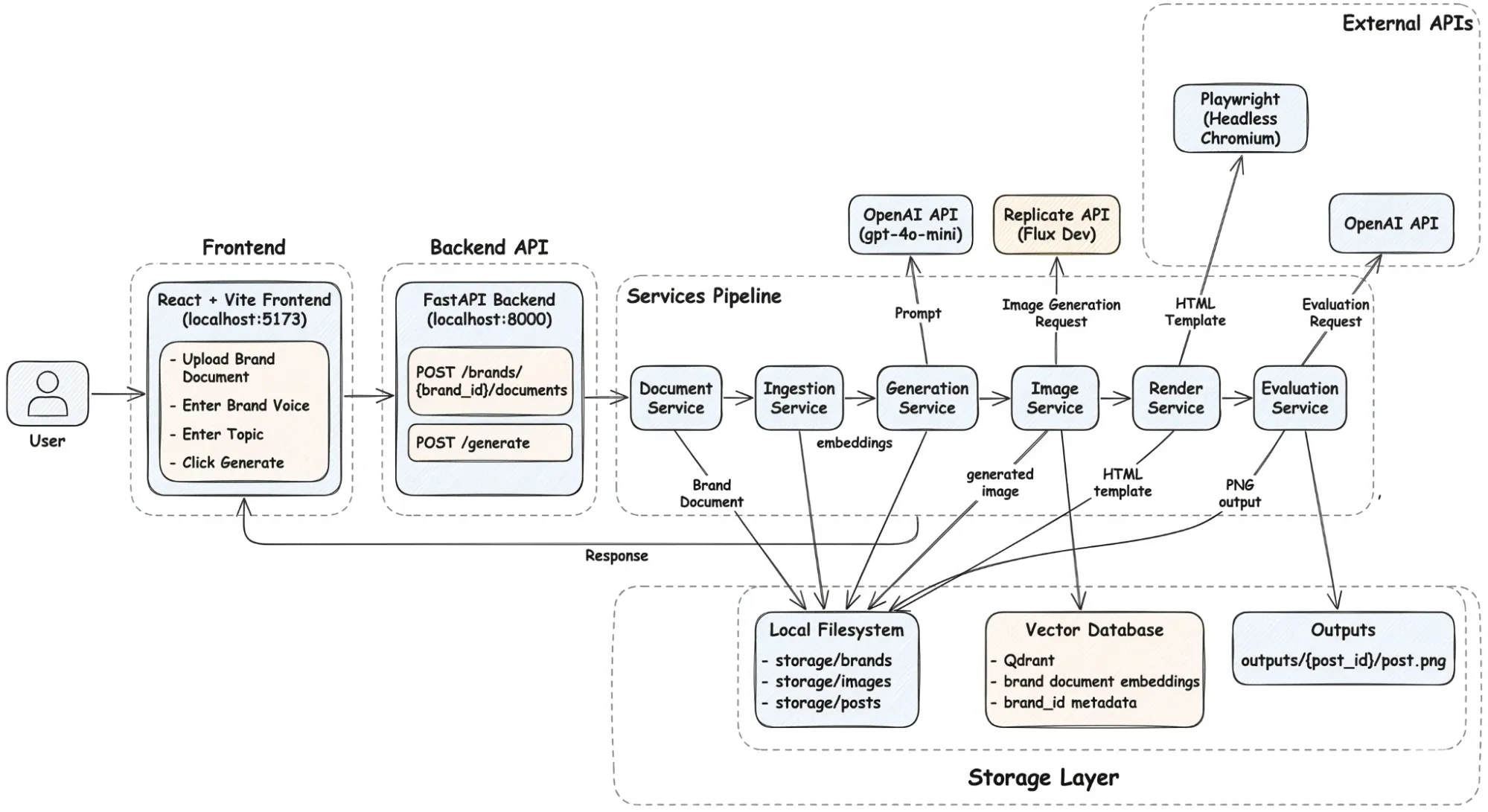
Before diving into the details of retrieval and generation, it helps to understand how the system itself is structured.
Project Structure
The project is organized around a clear separation between the frontend interface, the backend services, and the data storage layer.
brand_post_agent/
├── frontend/          # React dashboard (upload, preview, generate)
└── backend/
    ├── app/
    │   ├── api/
    │   │   ├── brands.py
    │   │   ├── documents.py
    │   │   ├── posts.py
    │   │   └── jobs.py
    │   ├── core/
    │   │   ├── config.py
    │   │   └── logging.py
    │   ├── services/
    │   │   ├── ingestion_service.py
    │   │   ├── rag_service.py
    │   │   ├── generation_service.py
    │   │   ├── image_service.py
    │   │   ├── render_service.py
    │   │   └── evaluation_service.py
    │   ├── vector/
    │   │   ├── qdrant_manager.py
    │   │   ├── hybrid_ingestor.py
    │   │   └── hybrid_searcher.py
    │   ├── prompts/
    │   │   ├── caption_prompt.txt
    │   │   ├── image_prompt.txt
    │   │   └── judge_prompt.txt
    │   └── main.py
    ├── storage/
    │   ├── brands/
    │   ├── posts/
    │   └── images/
    └── frontend/
The structure reflects a deliberate design decision: each component performs one task and hands its output to the next stage.
The frontend is responsible for collecting inputs from the user. The backend API handles request routing. Specialized services implement each stage of the pipeline.
This separation keeps the system modular and makes it easier to reason about failures. If something breaks in generation, it does not require touching the ingestion pipeline. If the retrieval strategy needs to change, it does not affect the rendering layer.
How a Generation Request Moves Through the System
At runtime, the flow begins with a user interacting with the frontend interface.
The frontend is built with React and Vite and serves primarily as a control panel for the system. Users can upload brand documents, select a brand identity, and enter the topic for the post they want to generate.
Once the request is submitted, it is sent to the FastAPI backend, which acts as the entry point for the entire pipeline.
The backend exposes endpoints for uploading documents and triggering generation requests. Rather than performing heavy processing itself, the API forwards requests to specialized services that implement the core functionality.
From there, the request moves through a series of stages:
- The Document Service stores uploaded brand assets so they can be processed later.
- The Ingestion Service converts those documents into embeddings and stores them in the vector database. This step transforms static documents into a searchable knowledge base.
- When a generation request arrives, the RAG Service queries the vector store and retrieves the most relevant brand context for the requested topic.
- The Generation Service then constructs a prompt using that context and calls the language model to generate the headline and caption.
- Once the text content is produced, the Image Service generates a visual that matches the theme of the post.
- The Render Service combines the generated text and image into an HTML layout representing the final social media post.
- Finally, the Evaluation Service runs a quality check on the generated content before it is returned to the user.
Behind the scenes, the system relies on two types of storage. The local file system stores uploaded brand documents, generated images, and final post assets. The Qdrant vector database stores document embeddings and metadata, enabling semantic retrieval during generation.
Under the Hood: The Mechanisms That Make the System Work
The architecture looks straightforward on paper. Upload a brand document, retrieve context, generate a post, render it as a PNG. Four steps.
What the diagram does not show is where most RAG systems quietly break. Retrieval returns the wrong chunks. Chunking destroys sentence context at boundaries. Generation runs without enough grounding. Outputs reach the user without any quality check.
Every one of those failure modes showed up during the build. This section explains the three mechanisms put in place to handle them.
Hybrid Retrieval: Why Dense Vectors Alone Are Not Enough
The first version of the retriever used dense vectors only. It worked well enough in early tests. Then the NudgeAI brand document was uploaded and queried for “Scribe features.”
The retriever returned chunks about AI writing tools and productivity workflows. Semantically correct but practically useless. The chunk that actually described the Scribe product scored lower than generic writing-related passages because the embedding model treated “Scribe” as a common noun rather than a specific product identifier.
This is not a model quality problem. Dense embeddings capture meaning; they are not designed to surface exact keyword matches. The fix is adding a second retrieval strategy that is specifically built for exact matches: BM25 sparse retrieval.
BM25 scores chunks based on term frequency. If a chunk contains the word “Scribe” three times and the query contains “Scribe”, that chunk ranks highly regardless of semantic similarity. Combined with dense retrieval and fused using Reciprocal Rank Fusion, the final result set handles both semantic questions and exact keyword lookups correctly.
Qdrant stores both vector types in a single collection, configured once at start-up:
client.create_collection(
    collection_name="brand_knowledge",
    vectors_config={
        "dense": models.VectorParams(
            size=384,
            distance=models.Distance.COSINE
        )
    },
    sparse_vectors_config={
        "sparse": models.SparseVectorParams()
    }
)
One important implementation detail: the Qdrant client’s internal _embed_sparse method is private and does not exist across all client versions. Using it silently breaks ingestion on client upgrades with no useful error. The fix is using fastembed directly:
self.dense_model = SentenceTransformer(settings.EMBEDDING_MODEL)
self.sparse_model = SparseTextEmbedding(model_name=settings.SPARSE_MODEL)

dense_vectors = self.dense_model.encode(texts).tolist()
sparse_embeddings = list(self.sparse_model.embed(texts))
Both vectors are written to the same Qdrant point:
PointStruct(
    id=str(uuid.uuid4()),
    vector={
        "dense": dense,
        "sparse": SparseVector(
            indices=sparse.indices.tolist(),
            values=sparse.values.tolist()
        )
    },
    payload=payload
)
The retriever now handles both “what does this brand sound like” and “what does this brand say about this specific product” correctly. For brand content generation, you need both.
Chunking: The Part That Determines Everything Downstream
Retrieval quality is set during ingestion, not during querying. Get chunking wrong and no amount of retrieval tuning will fix it.
Two failure modes were tested directly. Chunks that were too large returned sections containing the right information buried inside irrelevant paragraphs — and the model used the irrelevant parts too. Chunks that were too small lost the surrounding context that gave individual sentences meaning. Both produced noticeably worse captions.
The system uses a sliding window chunker with 300 words per chunk and 50 words of overlap:
splitter = RecursiveCharacterTextSplitter(
    chunk_size=300,
    chunk_overlap=50
)
The 50-word overlap handles chunk boundaries. A sentence that spans the end of one chunk and the start of the next appears in full in at least one of the two chunks. Without overlap, boundary content loses coherence and retrieval surfaces partial context.
Chunks below 200 characters are filtered out before ingestion. In practice these are page headers, section titles, table of contents entries, and footer text. They are not useful retrieval targets but they do compete with substantive chunks in search results. Removing them improved retrieval precision noticeably on documents with heavy header and footer content on every page.
Each chunk carries a brand_id in its payload, attached at ingestion time. This is what allows the retrieval layer to filter results by brand at the database level rather than pulling all chunks and filtering in application code.
Context Grounding: From Search Results to Generation Prompt
Retrieval solves the wrong problem if the retrieved content does not actually reach the model in a usable form. The RAG service handles this translation.
When a generation request arrives with a topic and a brand ID, the system runs a hybrid query against Qdrant filtered by brand_id. The top-K chunks are assembled into a context block and passed directly to the generation prompt:
def generate_post(self, topic: str, brand_id: str, brand_context: str = "") -> Dict:
    prompt = self.build_prompt(
        topic=topic,
        brand_id=brand_id,
        brand_context=brand_context
    )

    response = self.client.chat.completions.create(
        model=self.model,
        messages=[
            {
                "role": "system",
                "content": "You are an expert brand marketing copywriter who strictly follows provided brand context."
            },
            {
                "role": "user",
                "content": prompt
            }
        ],
        temperature=0.6,
        max_tokens=500
    )

    content = response.choices[0].message.content

    return {
        "text_output": content,
        "topic": topic
    }
The prompt template lives in app/prompts/caption_prompt.txt as a plain text file:
You are a brand-aware social media copywriter.

Do NOT use markdown formatting. No ** or * symbols anywhere.
Output exactly two lines in this format:
Headline: your headline here
Caption: your caption here

Use the following brand context to write a post:

{{brand_context}}

Topic: {{topic}}

Write:
- Headline: max 10 words, punchy and clear
- Caption: max 150 words, match the brand tone from the context above

Return only the headline and caption. No extra commentary. No markdown.
Keeping prompts in files rather than hardcoded strings is a small decision that paid off repeatedly during development. Prompt iteration means frequent small edits. Editing a text file with Uvicorn running in reload mode is a faster loop than modifying a Python string, saving, and waiting for the import chain to reload.
The model receives actual excerpts from the brand document, not a one-line tone description. The quality difference in output is consistent and significant.
LLM As a Judge: Catching What Generation Misses
A 200 response from the generation endpoint does not mean the output is good. During testing, GPT returned captions that were fluent and well-structured but used the wrong product name, contradicted a claim in the brand document, or drifted to a generic enthusiastic tone that the brand explicitly avoids.
None of these failures produce an error. They produce plausible-looking output that a human reviewer would have to read carefully to catch.
The evaluation service runs a second GPT call after generation. It receives the same brand context the generator used and the generated caption. The judge prompt instructs the model to return structured JSON only:
You are a brand quality evaluator.

Brand context:
{{context}}

Generated caption:
{{caption}}

Score the caption from 1 to 10 on each dimension:
1. Tone alignment with the brand voice
2. Factual accuracy against the brand documents
3. Engagement potential for social media

Return valid JSON only:
{"tone": 0, "accuracy": 0, "engagement": 0, "notes": "your feedback here"}
One important implementation detail: GPT does not always return clean JSON even when instructed to. It occasionally wraps the response in markdown fences or adds a preamble sentence. The evaluation service strips markdown fences and validates the JSON before returning it. If parsing fails, it returns a structured fallback with a zero score and the raw response in the notes field rather than crashing:
try:
    clean = result.replace("```json", "").replace("```", "").strip()
    parsed = json.loads(clean)
    return {"evaluation": json.dumps(parsed)}
except json.JSONDecodeError:
    return {
        "evaluation": json.dumps({
            "tone": 0,
            "accuracy": 0,
            "engagement": 0,
            "notes": f"Evaluation parsing failed. Raw: {result[:200]}"
        })
    }
The scores are returned alongside the generated content. They inform the human reviewer but do not automatically reject or regenerate output. The evaluator reduces the volume of bad outputs that reach review. It does not replace human judgment.
Rendering: HTML Templates Over Image Manipulation
Once generation is complete, the system needs to turn a headline, caption, and generated image into a 1080×1080 PNG ready for Instagram or LinkedIn.
The first instinct for this is usually an image manipulation library like Pillow. It gives you pixel-level control but makes typography, text wrapping, and layout alignment genuinely painful to get right. Every layout change requires code changes.
Instead, the render service uses an HTML template. The generated headline, caption, and image URL are injected as variables into app/templates/post_template.html. Layout, typography, brand colors, and spacing are all handled by CSS. Changing the post layout means editing a template file, not rewriting rendering code.
Playwright renders the final output:
with sync_playwright() as p:
    browser = p.chromium.launch()
    page = browser.new_page(viewport={"width": 1080, "height": 1080})
    page.set_content(html_content)
    page.screenshot(path=output_path, full_page=False)
    browser.close()
The viewport is set to exactly 1080×1080. The screenshot captures that frame as a PNG. The file is saved to storage/posts/ and served via FastAPI’s static file mount at /outputs/{post_id}.png. The generated endpoint returns both the file path and the accessible URL so the frontend can load it directly.
What the Full Response Looks Like
A successful call to POST /generate returns:
{
  "post_id": "string",
  "headline": "string",
  "caption": "string",
  "image_path": "string",
  "rendered_post_url": "string",
  "evaluation": "string"
}
Every field in that response represents a stage of the pipeline completing successfully. The rendered post URL loads directly in a browser. The evaluation scores are ready to display in the frontend review interface.
Key Takeaways
Most AI content tools fail at brand consistency for the same reason. They generate without grounding. The model has no access to your actual brand documentation, so every generation starts from zero and interpolates from its training distribution.
A better system prompt does not fix this. It reduces variance on an underspecified problem.
This architecture addresses the problem at the pipeline level. Brand documents are ingested once. Every generation request after that retrieves relevant context before the prompt is constructed. The model generates against your actual brand guidelines, not a description of them.
Three principles hold the system together across every component:
- Retrieval before generation. The model should never guess what your brand sounds like.
- Single responsibility per service. Each component does one thing. Failures are isolated and debuggable.
- Evaluation before delivery. A 200 response is not a quality guarantee.
None of these depend on a specific model or database. The embedding model, image generator, and evaluation model can all be swapped as the ecosystem evolves. The vector layer, the service boundaries, and the evaluation pattern stay the same.
Project Link
You can see the full code on GitHub.
At Superteams, we help you build AI agents customized to your business needs. To learn more, speak to us.

-Feature-Image.CjBFdO7y_Z1bTNvg.webp)