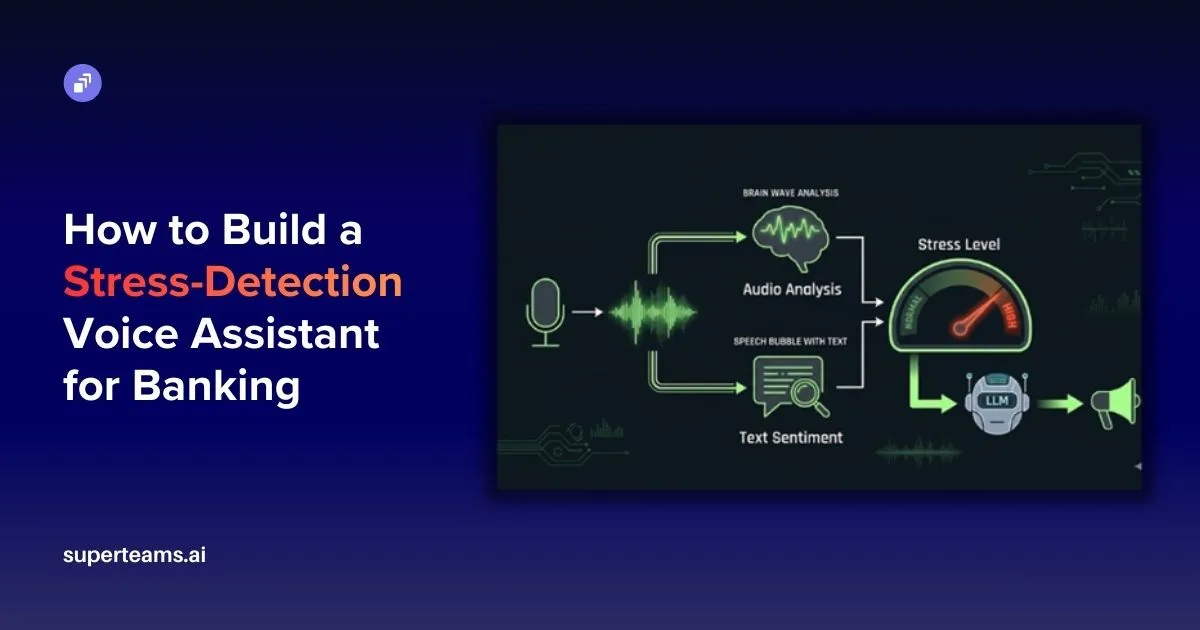
How we combined real-time speech analysis, sentiment detection, and LLM-powered responses to create an empathetic AI agent that actually listens — not just to words, but to emotions.
The Problem With Traditional Banking Support
Customer support in banking is one of the most emotionally charged interactions a person can have. Someone calling about a frozen account, an unauthorized transaction, or a lost card is rarely calm — they’re stressed, sometimes panicked.
Traditional IVR (Interactive Voice Response) systems are tone-deaf by design. Press 1 for balance. Press 2 for transactions. They don’t care if you’re whispering because you’re scared your account has been hacked, or shouting because your card was declined at a hospital. The response is identical.
Even modern AI chatbots and voice assistants suffer from the same blindness. They process what you say, but completely ignore how you say it. A customer who types “my card is not working” and one who types “PLEASE HELP MY CARD IS NOT WORKING I HAVE AN EMERGENCY” often get the same response.
We asked a different question: what if the AI could actually detect when someone is stressed — and automatically shift to a warmer, more empathetic tone?
That question became this project.
What This System Does
This is a real-time voice AI agent built for banking customer support that does the following in a continuous loop:
- Connects to a live audio room via LiveKit and listens for customer speech
- Detects when someone is speaking using energy-based Voice Activity Detection
- Transcribes speech in real-time using Faster Whisper
- Analyzes the audio signal (loudness and pitch) to detect raised voices or shouting
- Analyzes the transcribed text (sentiment and urgency keywords) to detect distress in language
- Combines both signals into a single stress level: NORMAL or HIGH
- Passes this stress level to an LLM (Llama 3.1 via Groq) which adjusts its tone accordingly
- Speaks the response back via text-to-speech
- Gracefully transfers the call to a human agent when stress is persistently high or the customer requests it
The result is an AI agent that doesn’t just answer questions — it reads the room.
Architecture Overview
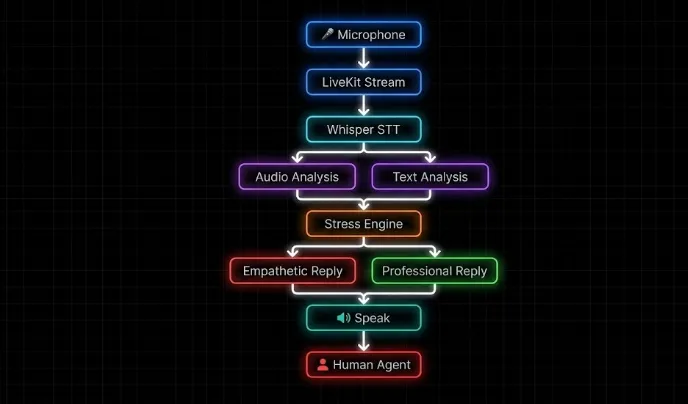
Here’s how data flows through the system from mic to speaker:
Microphone → LiveKit Room
                  ↓
           Audio Frame Buffer
           (numpy float32 samples)
                  ↓
        Voice Activity Detection
        (energy threshold > 0.04)
                  ↓
        Faster Whisper (STT)
        (base model, VAD filter, beam_size=5)
                  ↓
         ┌────────┴────────┐
         ↓                 ↓
   Audio Analysis     Text Analysis
   (librosa: RMS,    (TextBlob sentiment +
    pitch via YIN,    urgency keyword list)
    energy peaks)
         ↓                 ↓
         └────────┬────────┘
                  ↓
          Stress Fusion Engine
          (weighted score → NORMAL / HIGH)
                  ↓
        LLM Response Engine (Groq)
        (Llama 3.1 8B, tone-conditioned prompt)
                  ↓
          pyttsx3 TTS → Speaker
                  ↓
        (If HIGH stress → Human Handoff)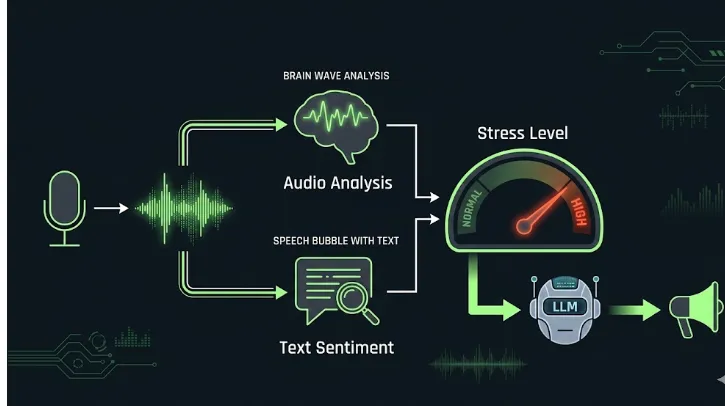
Each component is a standalone Python module, making the system easy to extend or swap individual parts without touching the core pipeline.
Component Breakdown
LiveKit — Real-Time Audio Transport
LiveKit handles the WebRTC layer. The agent connects to a room, subscribes to the customer’s audio track, and processes frames as they arrive. Each frame is a short chunk of int16 PCM audio that gets converted to float32 for signal processing.
async def handle_audio(track):

    global is_speaking, last_speech_end_time

    if track.kind != rtc.TrackKind.KIND_AUDIO:
        return

    print(" Listening...")

    audio_stream = rtc.AudioStream(track)

    frames = []
    speech_started = False
    silence_counter = 0

    async for frame in audio_stream:

        if is_speaking or (time.monotonic() - last_speech_end_time) < SPEECH_COOLDOWN_SEC:
            frames.clear()
            speech_started = False
            silence_counter = 0
            continue

        try:
            raw = frame.frame.data
        except AttributeError:
            raw = getattr(frame, "data", None)

        if raw is None:
            continue

        samples = np.frombuffer(raw, dtype=np.int16).astype(np.float32) / 32768.0

        volume = np.abs(samples).mean()

        # Lower threshold for better speech detection
        if volume > 0.01:

            speech_started = True
            silence_counter = 0
            frames.append(samples)

        elif speech_started:

            silence_counter += 1

            if silence_counter < 20:
                frames.append(samples)
                continue

            if len(frames) < 40:
                frames.clear()
                speech_started = False
                silence_counter = 0
                continue

            try:

                text, audio_file = await process_audio(frames)

                frames.clear()
                speech_started = False
                silence_counter = 0

                if len(text) < 3:
                    continue

                print("\n User said:", text)

                conversation_history.append("User: " + text)

                if wants_human(text):

                    summary = create_handoff_summary(conversation_history)

                    msg = "I'll connect you with a human agent now."

                    speak(msg)

                    transfer_to_human(summary)
                    continue
The threshold of 0.04 was tuned to ignore background noise while catching genuine speech. The 22-frame silence counter (roughly half a second) prevents the system from cutting off a speaker mid-sentence — an important detail that makes conversations feel natural rather than choppy.
Faster Whisper: Speech-to-Text
Once a speech segment is captured, it gets written to a temporary WAV file and transcribed using Faster Whisper’s base model:
async def process_audio(audio_frames):
    audio = np.concatenate(audio_frames)
    sf.write("temp_audio.wav", audio, 48000)

    segments, _ = model.transcribe(
        "temp_audio.wav",
        beam_size=5,
        vad_filter=True,
        language="en"
    )

    text = ""
    for seg in segments:
        text += seg.text

    return text.strip(), "temp_audio.wav"
The vad_filter=True option runs Whisper’s own internal VAD on top of our energy-based detection, acting as a second filter to remove silence artifacts. The base model runs efficiently on CPU with compute_type="int8" quantization — no GPU required, making it cost-effective for real call center deployments.
How Stress Is Detected
Stress detection is the heart of this system. It runs on two parallel channels simultaneously: the raw audio signal and the transcribed text. Neither alone is reliable — together they create a robust signal.
1. Audio Stress Analysis
The audio analyzer uses librosa to extract two key features from the voice signal: energy (loudness) and pitch (fundamental frequency).
def analyze_audio(audio_file):
    y, sr = librosa.load(audio_file, sr=None)

    # RMS energy — how loud is the voice?
    rms = librosa.feature.rms(y=y)[0]
    energy = np.mean(rms)
    energy_max = np.max(rms) if len(rms) > 0 else energy

    # Pitch via YIN algorithm
    f0 = librosa.yin(y, fmin=50, fmax=300)
    pitch = np.nanmean(f0)
    if np.isnan(pitch):
        pitch = 120.0

    # Normalize energy: calm ~0.03–0.06, loud ~0.06–0.09, shouting ~0.1+
    energy_norm = np.clip(energy / 0.09, 0.0, 1.0)
    peak_norm = np.clip(energy_max / 0.15, 0.0, 1.0)
    loudness = max(energy_norm, peak_norm * 0.7)

    pitch_norm = np.clip((pitch - 80.0) / (280.0 - 80.0), 0.0, 1.0)

    # Loudness dominates (70%) — shouting is primarily a loudness signal
    stress_score = 0.7 * loudness + 0.3 * pitch_norm
    return float(np.clip(stress_score, 0.0, 1.0))
Why loudness over pitch? Because pitch is unreliable across different voices — a deep-voiced man speaking calmly may have a naturally higher base pitch than a stressed woman. Loudness, however, is a near-universal stress signal. When people are scared or angry, their voice gets louder. The RMS energy metric captures this directly.
Peak energy (energy_max) is also considered alongside the mean, because stressed speech often has sharp bursts of loudness even if the average is moderate. Someone who is mostly composed but has one sharp outburst — “This is IMPOSSIBLE!” — will register that peak.
2. Text Stress Analysis
While audio catches how something is said, text analysis catches what is said. We combine two approaches: keyword matching for urgent banking phrases, and sentiment analysis via TextBlob for negative emotional language.
URGENCY_PHRASES = [
    "please help", "help me", "i need help", "lost my card", "i lost",
    "stolen", "missing", "urgent", "emergency", "not working",
    "problem", "issue", "scared", "worried", "fraud", "unauthorized",
]

def analyze_text(text):
    lower = text.strip().lower()

    # Direct urgency: banking-specific distress signals
    urgency = 0.7 if any(p in lower for p in URGENCY_PHRASES) else 0.0

    # Sentiment: negative polarity = potential stress/anger
    sentiment = TextBlob(text).sentiment.polarity  # -1 to +1
    sentiment_stress = max(0.0, -sentiment)

    # Take whichever signal is stronger
    return max(urgency, sentiment_stress)
A customer saying “I need help, I think someone used my card without permission” would score 0.7 from urgency keywords alone, regardless of sentiment. A customer saying something negative that doesn’t match the keyword list (e.g., “this is absolutely ridiculous”) would still score based on TextBlob’s negative sentiment detection. The max() ensures we never miss a stress signal just because it comes from one channel and not both.
3. Fusing Both Signals
def check_stress(audio_score, text_score):
    # Raised voice alone is enough — even if words are calm
    if audio_score >= 0.42:
        return "HIGH"

    # Combined weighted score
    final_score = (audio_score * 0.6) + (text_score * 0.4)
    if final_score > 0.42:
        return "HIGH"

    return "NORMAL"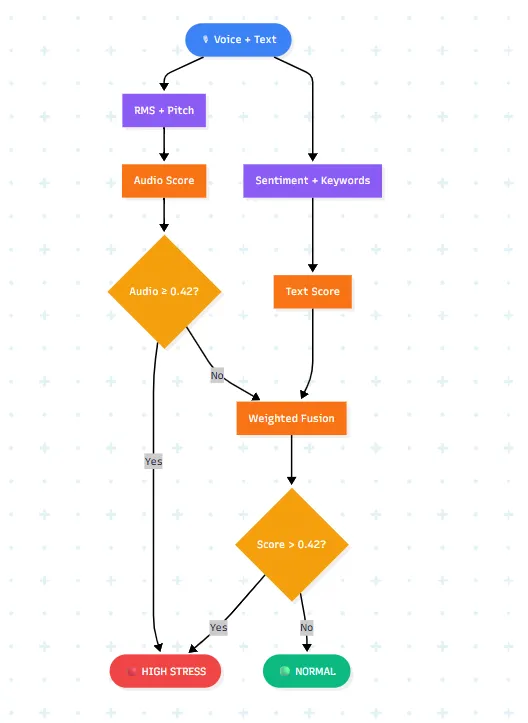
The fusion logic is intentionally biased towards caution. Audio carries 60% of the weight because we trust the voice signal more than words alone — a customer can mask their distress in their word choice but rarely in their voice. The 0.42 threshold on audio alone means that even a slightly raised voice triggers empathetic mode. We’d always rather respond with warmth to a calm customer than respond neutrally to a distressed one.
Empathetic Response Generation
Once stress is detected, the response engine adjusts the LLM’s behavior through prompt conditioning. The same underlying model produces completely different responses based on whether stress is NORMAL or HIGH.
def generate_response(text, stress_level, history):
    context = "\n".join(history[-6:])

    prompt = f"""
You are a professional banking customer support assistant.

Conversation so far:
{context}

Latest customer message: {text}
Detected stress level: {stress_level}

If STRESS LEVEL = NORMAL:
- Clear, professional tone.
- Provide solution or ask for required info.
- Maximum 2 sentences.

If STRESS LEVEL = HIGH:
- First acknowledge their feelings so they feel heard.
- Speak gently and reassure them you will help.
- Then guide them toward resolving the issue.
- Never sound robotic, cold, or rushed.
- Maximum 2 sentences.

Example HIGH response:
"I understand this must be stressful — please don't worry,
I'm here to help. Could you share your account number so
we can get this sorted right away?"
"""
The model used is Llama 3.1 8B Instant via Groq, which keeps latency low (typically under 500ms). Temperature is set to 0.3 to keep responses consistent and professional, while max_tokens is capped at 120 to enforce brevity — this is a voice interface, not a chat window. Nobody wants to listen to a 5-sentence AI response while they’re panicking about their account.
The last 6 turns of conversation are included as context, so the agent handles multi-turn flows naturally — the customer doesn’t need to repeat themselves on follow-up questions.
Human Handoff
When a caller explicitly asks for a human agent, or when the stress level is persistently high, the system triggers a graceful transfer. The key insight here is that the handoff should never feel abrupt — the customer should feel reassured even in that transitional moment.
WANT_HUMAN_PHRASES = [
    "talk to human", "speak to human", "real person", "live agent",
    "transfer me", "human please", "agent please", "not ai", ...
]

if wants_human(text):
    summary = create_handoff_summary(conversation_history)
    speak("I'll connect you with a human agent now. Please hold.")
    transfer_to_human(summary)
Before transferring, the system generates a full conversation summary — up to 20 prior turns — and passes it to the human agent. This means the agent doesn’t start cold. They know the customer’s issue, how long the conversation has been, and what was already attempted.
def create_handoff_summary(history):
    if not history:
        return "No conversation yet."
    messages = history[-20:] if len(history) > 20 else history
    return "\n".join(messages)
This is a meaningful quality-of-life improvement — the customer doesn’t have to repeat themselves to the human agent. Nothing is more frustrating during a stressful banking issue than explaining the entire situation twice.
Echo Prevention & Timing
One of the trickier engineering challenges in a voice agent is echo suppression — preventing the agent from hearing its own TTS output and treating it as new customer input. Without this guard, the agent would transcribe its own speech, generate a response to itself, and spiral into an infinite loop.
The solution uses two flags working together:
is_speaking = False
SPEECH_COOLDOWN_SEC = 1.5
last_speech_end_time = 0.0

# Ignore all mic input while the agent is speaking
if is_speaking:
    frames.clear()
    speech_started = False
    continue

# After the agent finishes, ignore mic for 1.5 seconds
if (time.monotonic() - last_speech_end_time) < SPEECH_COOLDOWN_SEC:
    frames.clear()
    continue
is_speaking is set to True right before the TTS thread starts, and flipped back to False only after the thread completes — ensuring no partial frames sneak through. The 1.5-second cooldown after speaking covers acoustic echo, which is the residual sound bouncing off walls and re-entering the microphone even after TTS has fully stopped. In a real office environment, this tail can last surprisingly long.
The entire stack runs on CPU, making it deployable without any GPU infrastructure — important for cost-effective call center deployment at scale.
Text to Speech
pyttsx3 is an offline text-to-speech (TTS) library in Python. It converts text into spoken audio without requiring an internet connection. The library itself does not generate speech directly; instead, it uses the speech engine available in the operating system.
On Windows, pyttsx3 works with the Microsoft Speech API (SAPI5) driver. This API is built into Windows and provides system voices like Zira or David.
On Linux systems (Ubuntu, Raspberry Pi OS, etc.), the SAPI5 driver is not available. Instead, pyttsx3 uses the eSpeak speech synthesizer, which is a lightweight open-source TTS engine commonly installed on Linux machines.
Because of this difference, if your code explicitly initializes the engine with:
engine = pyttsx3.init(driverName="sapi5")it will only work on Windows. When running on Linux or Raspberry Pi, the driver should be changed to espeak. A common approach is to detect the operating system and select the appropriate driver automatically, allowing the same code to run on both platforms.
import pyttsx3
import platform

system = platform.system()

if system == "Windows":
    engine = pyttsx3.init(driverName="sapi5")
else:
    engine = pyttsx3.init(driverName="espeak")

engine.say("Hello, this is text to speech")
engine.runAndWait()
Example Interactions with the Stress-Aware Voice Agent
To better understand how the system adapts its responses based on detected stress levels, consider the following interaction examples.
Example 1: Normal Customer Query
Customer: “I want to check my account balance.”
Detected Stress Level: Normal
Agent: “Sure, I can help with that. May I have your account number so I can check your balance?”
Example 2: Customer Worried About Lost Debit Card
Customer: “I lost my debit card and I’m really worried someone might use it.”
Detected Stress Level: High
Agent: “I understand this must be stressful, but don’t worry—I’ll help you secure your account right away. Could you please confirm your account number so I can block the card?”
Example 3: Angry Customer
Customer: “Why is money missing from my account?!”
Detected Stress Level: High
Agent: “I understand how upsetting that must feel, and I’m here to help resolve it. Could you please share your account number so I can check what happened?”
Instead of reacting defensively, the system responds empathetically while guiding the customer towards a solution.
Project Link
You can explore the project here:
The gap between an AI that responds to a customer and one that understands them is smaller than it seems. Combining audio stress analysis with text sentiment and routing that signal through the LLM’s tone is a lightweight addition to any voice bot — but the impact on customer experience is real. A caller who is panicking gets reassurance. A caller who is calm gets efficiency. Both get what they actually need.
At Superteams, we help you build voice agents customized to your business needs. To learn more, speak to us.
-Feature-Image.CjBFdO7y_Z1bTNvg.webp)