
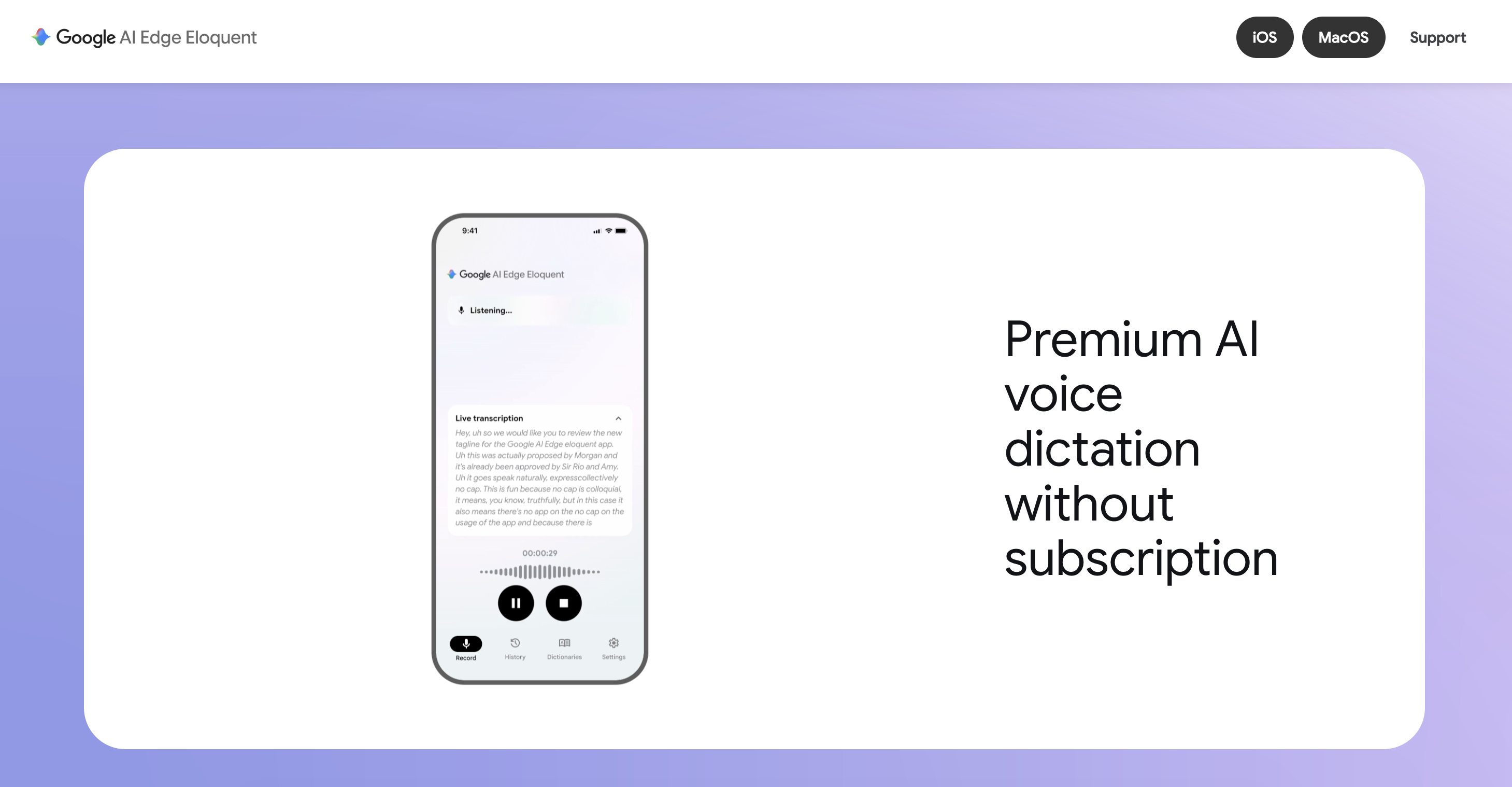
Google AI Edge Eloquent is Google’s dictation and voice-editing app, launched quietly on iOS on April 7, 2026, that turns spoken audio into clean, professional text without sending that audio to a server. It transcribes speech, strips out filler words and self-corrections in real time, and then, on voice command, rewrites the result into whatever shape the user asks for: a formal email, a short summary, a translated version, all of it running on the device’s own chip. The name doubles as a label for what it demonstrates: Eloquent is the flagship consumer app built on Google AI Edge, Google’s on-device machine-learning platform, and it exists partly to show developers what that platform’s on-device language models are capable of when wired into a real product.
What It Actually Does
Eloquent’s core loop has three stages: live recording (or importing an existing audio/video file), automatic disfluency removal (“um,” “ah,” false starts, self-corrections), and on-demand rewriting into a target style, “Key points,” “Formal,” “Short,” or “Long”, triggered by a voice command or a tap. Both the raw transcript and the polished version are kept side by side, so a user can compare what they actually said against what the app produced. It ships free, with no subscription and no cap on core dictation usage.
Architecture: An On-Device Pipeline, With an Optional Cloud Lane
The distinguishing design choice is that the entire default path, speech-to-text and the rewrite step, runs locally using Gemma-based models, so transcription works with no network connection once the model has been downloaded once. An optional “cloud mode” exists for specific advanced styles or non-English polishing, which instead calls Google’s larger, cloud-hosted Gemini models.
graph TD
    A["Microphone or imported audio/video"]
    subgraph OnDevice["On-Device (default)"]
    B["On-device ASR (Gemma-based)"]
    C["Disfluency cleanup: remove filler words, false starts"]
    D["On-device rewrite model (Gemma 3n or Gemma 4 12B)"]
    end
    subgraph Cloud["Cloud Mode (opt-in)"]
    E["Advanced styles / non-English polishing via Gemini"]
    end
    F["Raw transcript + polished text, side by side"]

    A --> B --> C --> D --> F
    C -.->|"user opts in"| E
    E -.-> F

    classDef default fill:#ffffff,stroke:#4338CA,stroke-width:2px,color:#0F172A,rx:8px,ry:8px;
    classDef data    fill:#EEF0F7,stroke:#0D9488,stroke-width:2px,color:#0F172A,rx:8px,ry:8px;
    classDef process fill:#F7F8FC,stroke:#6366F1,stroke-width:2px,color:#0F172A,rx:8px,ry:8px;
    classDef output  fill:#4338CA,stroke:#4338CA,stroke-width:2px,color:#ffffff,rx:8px,ry:8px;
    class A data;
    class B,C,D process;
    class E process;
    class F output;
That default-offline, opt-in-cloud structure is the same trade-off documented on Gemma 3n E4B’s page: keeping inference on-device turns a per-request cloud bill into a one-time model download, at the cost of being bounded by whatever a phone or laptop’s chip can run.
Rewrite Styles Are One Model, Different Prompts
Eloquent’s “Key points,” “Formal,” “Short,” and “Long” modes aren’t separate models: they’re the same on-device rewrite model given a different instruction alongside the cleaned-up transcript. This is the same pattern any developer building on Google AI Edge would use, prompt the local model differently rather than shipping multiple checkpoints, which keeps the on-device footprint to a single model no matter how many output styles the app exposes.
# Scenario: a journalist dictating rough notes in the field who
# wants the same recording turned into a quick bullet summary for
# themselves and a polished paragraph for an editor, without
# re-recording anything or waiting on a network round trip.
# (llm is the same on-device LlmInference instance loaded once,
# as shown in the frontmatter example above.)
cleaned_transcript = "The compressor unit is leaking coolant near the valve."

styles = {
    "Key points": "Rewrite as 3 short bullet points, no full sentences.",
    "Formal": "Rewrite as a formal, professional sentence.",
    "Short": "Rewrite in under 10 words.",
    "Long": "Expand into a detailed paragraph with likely context.",
}

for style, instruction in styles.items():
    prompt = f"{instruction}\n\nText: {cleaned_transcript}"
    print(f"[{style}]", llm.generate_response(prompt))
# Same on-device model, same weights loaded once, four different
# outputs, no extra model download per style.
Two Platforms, Two Models
Eloquent doesn’t use one fixed model across every device. It uses whichever on-device model fits the hardware it’s running on, which is why the iPhone/iPad release and the later macOS release lean on different Gemma generations:
| iOS / iPadOS release | macOS release | |
|---|---|---|
| Launch | April 7, 2026 | Later in 2026 |
| On-device model | Gemma-based ASR + rewrite models (Gemma 3n family) | Gemma 4 12B |
| Interaction | Live dictation, tap-to-select rewrite styles | Voice-driven editing via a global hotkey, e.g. “restructure these notes into an executive summary” |
| Requirement | iOS/iPadOS 16 or later | Runs entirely on-device on a standard laptop |
| Google’s claim | Real-time, offline-first dictation | ”Superior instruction following, stricter scope adherence, and a 60%+ jump in overall quality” vs. earlier models, per Google’s own announcement |
The pattern mirrors why Gemma 3n E4B exists at all: a phone has a tighter memory budget than a laptop, so Eloquent’s iOS build reaches for a smaller, edge-optimized Gemma 3n model, while the macOS build, with more RAM and a beefier chip to work with, can afford a larger 12B-parameter Gemma 4 model for noticeably better instruction-following on complex voice-driven rewrites.
Interactive: Why the Same App Uses Different Model Sizes on Different Devices
Model memory footprint scales directly with parameter count and how much each parameter is compressed (quantized) for on-device use. This is a big part of why Eloquent can’t just ship the same model everywhere: a model sized for a laptop’s RAM budget may not fit in a phone’s. The widget below applies the basic memory formula (parameters × bytes per parameter) to show why.
The Google AI Edge Platform Underneath
“Google AI Edge” in the app’s name isn’t just branding, it’s the name of Google’s broader on-device ML developer platform, which Eloquent is built on and showcases:
- LiteRT (formerly TensorFlow Lite): the runtime that executes models on-device across Android, iOS, and embedded hardware.
- LiteRT-LM: a runtime specifically built for running large language models on-device efficiently, referenced in Google’s own Eloquent announcement as the source of the performance and memory benchmarks behind running a 12B-parameter model on a laptop.
- MediaPipe GenAI tasks, including the LLM Inference API, which wraps a Gemma-family model behind a simple
generate_response()-style call so app developers don’t have to hand-roll tokenization, KV-cache management, or hardware acceleration themselves. - Google AI Edge Gallery, a companion app that lets developers browse and try on-device models directly, part of the same ecosystem Eloquent draws from.
Eloquent is, in effect, Google’s own reference implementation of what a developer can build with these pieces: a production consumer app that never has to phone home for its core functionality.
Privacy and the Cloud Mode Trade-off
Because the default path is fully on-device, audio never has to leave the device for standard dictation and rewriting; Google’s own product description frames this as capturing “intended meaning” rather than doing verbatim transcription, since the rewrite step is explicitly allowed to smooth phrasing. The trade-off surfaces only when a user opts into cloud mode for capabilities the on-device model isn’t sized for, non-English polishing beyond what’s been tuned locally, or a small set of advanced rewrite styles routed to cloud-hosted Gemini models instead. That optional lane is the one place Eloquent’s privacy story depends on a choice rather than an architectural default.
What’s New (2025–2026)
Eloquent shipped quietly on iOS on April 7, 2026, with no major keynote, TechCrunch described the release as Google “quietly” releasing an offline-first dictation app, alongside a personal-vocabulary dictionary for specialized terms and support for transcribing existing audio and video files, not just live speech. The bigger architectural jump came with the macOS release later in the year, which paired Eloquent with the newly announced Gemma 4 12B model and introduced voice-driven, hotkey-triggered text editing, positioning Eloquent less as “a dictation app” and more as an early example of local, agentic, voice-first workflows Google AI Edge is meant to enable, alongside sibling tools like Google AI Edge Gallery.
Where It Fits
Eloquent is best suited to private, offline-first use: journaling, first drafts, meeting notes, and voice-first composition where a user wants speech turned into clean text without an internet dependency or a cloud provider seeing the audio. It is not positioned as a professional transcription tool requiring verbatim, timestamped accuracy, the disfluency-removal and rewrite steps are explicitly there to smooth phrasing, which is the wrong behavior for a legal or medical transcript. For that narrower need, a dedicated ASR model benchmarked on word-error rate, like Canary-Qwen 2.5B, is the better fit; Eloquent is optimized for turning a rough voice memo into usable prose, not for preserving exactly what was said.
How to Use: building an Eloquent-style on-device dictation pipeline with Google AI Edge
# Scenario: a field-service app needs voice notes turned into
# clean, structured text on a technician's phone, with no
# audio ever leaving the device (no connectivity on job sites).
from mediapipe.tasks.python.genai import llm_inference

# Step 1: on-device ASR produces a raw, disfluent transcript
# (e.g. via a Gemma-based or Whisper-family on-device model)
raw_transcript = "uh so the the compressor unit is is leaking coolant near the uh valve"

# Step 2: an on-device LLM (same role Gemma 3n/Gemma 4 play
# inside Eloquent) cleans it up, entirely offline
options = llm_inference.LlmInferenceOptions(
    model_path="/models/gemma-3n-e4b-it.task",
    max_tokens=256,
)
llm = llm_inference.LlmInference.create_from_options(options)

prompt = f"Rewrite as a clean work-order note, no filler words:\n{raw_transcript}"
print(llm.generate_response(prompt))
# -> "The compressor unit is leaking coolant near the valve."
Ready to build?
Leverage AI technologies to build your product stack
Superteams can help you build, deploy and launch AI application stacks using open source technologies — from architecture through to production.
Talk to Superteams