

Did you know that recent advances in text-to-video models have made it possible for us to generate visually rich, audio-synchronized clips directly from natural language prompts? Among these, LTX (by Lightricks) stands out for its ability to generate longer videos with synchronized audio, making it especially interesting for storytelling, advertising, and social media content.
In this article, we’ll explore two key dimensions of LTX video generation:
- Model choice: LTX-Fast vs LTX-Pro
- Generation strategy:
- Scene-based generation using image seeding
- Single-prompt long video generation
Our goal is not to benchmark raw visual quality, but to understand how architectural design choices can interact with prompting strategies and how that affects realism, continuity, and narrative coherence in 20-30 second videos.
Models Under Study: LTX-Fast and LTX-Pro
Although LTX-Fast and LTX-Pro share the same core interface, they are optimized for different temporal behaviors during generation. These differences become especially noticeable as video duration increases.
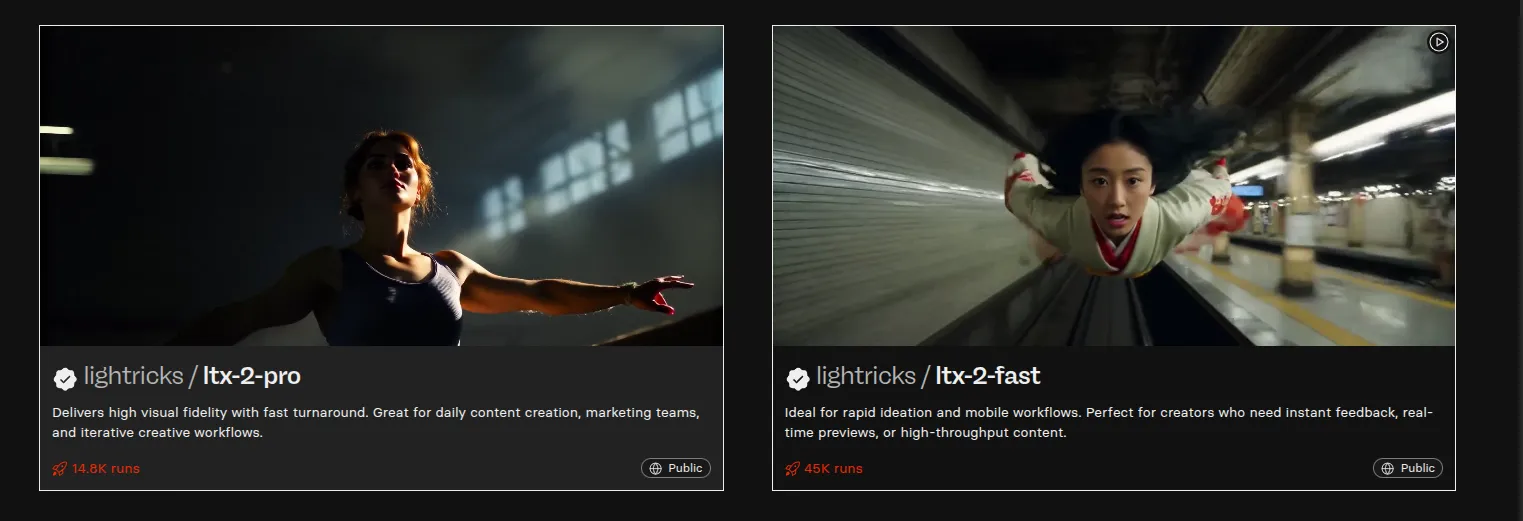
Fig. 1. Lightricks Models.
LTX-Fast and LTX-Pro share the same multimodal diffusion-based video architecture, including text–image conditioning, spatiotemporal latent modeling, and joint audio-video generation. The primary distinction lies in how temporal coherence is enforced: LTX-Fast emphasizes local, shot-level consistency, while LTX-Pro emphasizes global, sequence-level continuity.
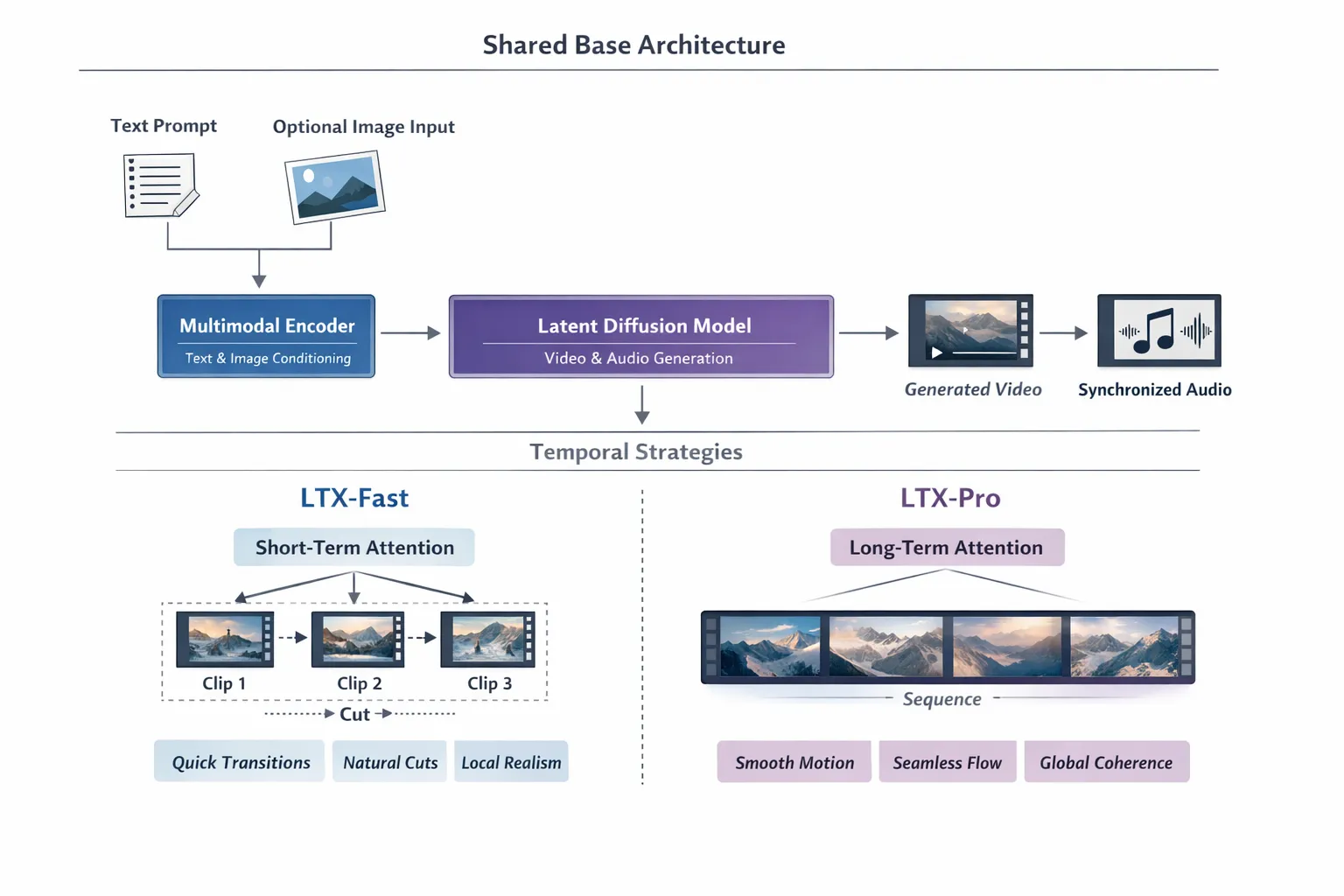
Fig. 2. Architecture of LTX Models.
At a high level, both LTX-Fast and LTX-Pro share the following pipeline:
1. Multimodal Conditioning Encoder
Both models ingest multiple modalities:
-
Text prompt
- Scene description
- Camera motion
- Environmental cues
- Audio intent (music, ambience, sound effects)
-
**Optional image conditioning
**
- Used as a visual anchor
- Strongly influences appearance, color, and composition
Text and image inputs are encoded in a shared latent conditioning space, allowing visual and audio generation to remain synchronized.
A shared latent conditioning space means that text, image, and audio inputs are encoded into the same latent representation space, rather than separate, disconnected ones.
Instead of:
- text → text-only embedding
- image → image-only embedding
- audio → audio-only embedding
all modalities are projected into a unified conditioning space, enabling tight synchronization between visual, motion, and audio generation.
Text prompt  ─┐
Image input  ─┼─► Multimodal Encoder ─► Shared latent conditioning vector
Audio cues   ─┘
Fig. 3. Latent Conditioning.
2. Spatiotemporal Video Latent Space
Rather than generating raw pixels frame-by-frame, LTX operates in a compressed spatiotemporal video latent space.
Each video latent token encodes:
- Spatial information (objects, textures, lighting)
- Temporal information (motion dynamics, transitions, camera movement)
This representation enables:
- Long-range motion reasoning
- Temporal consistency across frames
- Stable camera trajectories
Both LTX-Fast and LTX-Pro use this same underlying video latent representation; they differ primarily in how long and how globally they attend to these latents during generation.
3. Diffusion-Based Multimodal Generation
LTX models follow a diffusion-style denoising process over spatiotemporal video latents, progressively removing noise until coherent motion and structure emerge.
During diffusion:
- Visual appearance and motion evolve jointly
- Camera movement stabilizes over time
- Scene-level coherence is maintained
Crucially, audio generation is not added after video generation completes.
Instead:
- Audio is generated in parallel, conditioned on the same shared latent representation
- Visual and audio cues co-evolve temporally, guided by the same prompt semantics and timing signals
This design explains why:
- Explicit audio progression in prompts (e.g., “music builds”, “wind intensifies”) results in smoother, more continuous sound.
- Audio feels synchronized with motion rather than layered on top post-hoc.
Text / Image / Audio prompts
            │
            ▼
   Shared latent conditioning
            │
   ┌──────────—──—───┐
   ▼                     ▼
Video diffusion   Audio generation
(over video       (conditioned,
latents)          time-aligned)
Fig. 4. Conceptual Flow.
While diffusion operates directly over video latents, audio is generated through a parallel conditioned pathway, allowing both modalities to remain synchronized without requiring a single joint latent tensor.
4. Audio-Visual Co-Generation
Unlike many video models, LTX integrates audio generation into the core pipeline:
- Ambient sounds
- Environmental noise
- Music progression
Audio is conditioned on:
- Prompt semantics
- Temporal evolution of the video
This shared audio-visual timeline is common to both Fast and Pro.
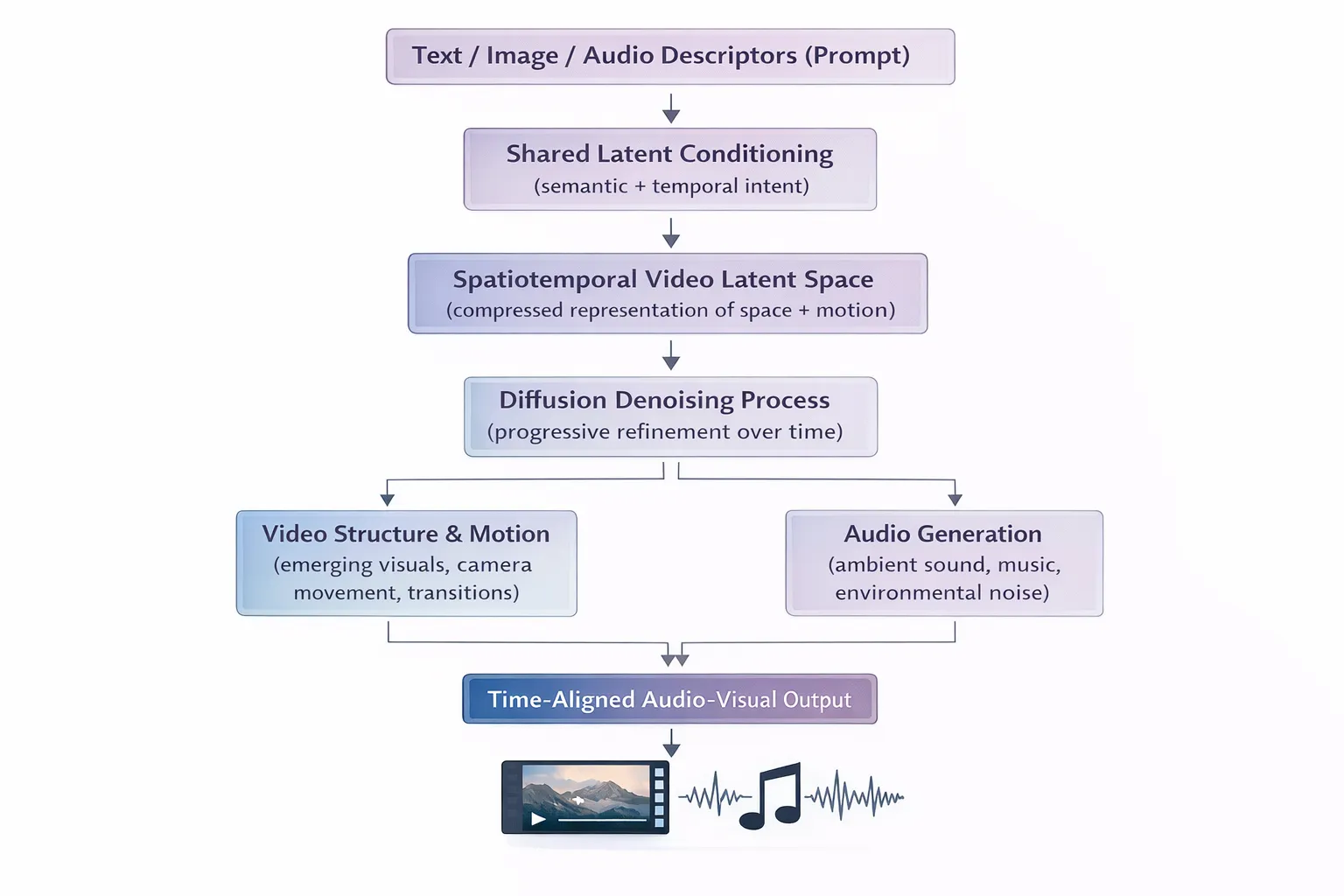
Fig. 5. Conceptual Flow: From Video Diffusion to Audio-Visual Co-Generation.
Where Does LTX-Fast and LTX-Pro Diverge?
With the shared foundation established, the difference between Fast and Pro is not “what they are” but “how far they look in time.”
LTX-Fast: Shot-Oriented Temporal Modeling
LTX-Fast is optimized for speed and local temporal consistency. Architecturally, it prioritizes short-range frame coherence over long-range planning.
Key characteristics:
- Strong frame-to-frame consistency within short windows
- Motion and camera behavior reset naturally at clip boundaries
- Less aggressive global smoothing across time
- Preserves micro-variations in motion (wind, fabric, footsteps)
In practice, this results in videos that feel grounded and shot-like, closer to traditional edited footage. Scene boundaries are visible, but they often resemble intentional cinematic cuts.
LTX-Pro: Sequence-Oriented Temporal Modeling
LTX-Pro is optimized for global coherence over longer durations. It maintains a stronger internal representation of the full sequence while generating frames.
Key characteristics:
- Longer temporal receptive field
- Stronger enforcement of consistent lighting, motion, and camera paths
- Smoother transitions across time
- More uniform audio evolution
This produces videos that feel continuous and flowing, especially when generated from a single prompt. However, when generation is restarted multiple times (as in scene chaining), this global smoothing can sometimes reduce perceived realism.
Model-Level Comparison: Temporal Characteristics
Aspect
LTX-Fast
LTX-Pro
Temporal Receptive Field
Short
Long
Time Span Emphasized
Local windows
Full sequence
Frame-to-Frame Focus
Strong
Moderate
Long-Range Consistency
Light
Strong
Two Approaches to Long Video Generation
We experimented with two different strategies to generate videos in the 20–30 second range.
Approach 1: Scene-Based Generation with Image Seeding
Method
- Generate an initial anchor image
- Produce (3) short video clips (10 seconds each)
- Extract the last frame of each clip
- Use that frame as the image seed for the next clip
- Concatenate all clips into a single video
This approach attempts to preserve visual continuity while allowing narrative progression through controlled prompts.
This is where we start with the code:
Begin by cloning in the Git repository, using:
git clone [email protected]:pracheeeeeez/LTX-2.git
Install the requirements.
pip install -r requirements.txt
Now, let’s move to demo_with_ltx.py
We will walk you through the code:
1. Make all the imports
import os
import subprocess
import requests
import replicate
from PIL import Image
2. Next, define the scenes, which act as prompts for the video generation. You can refer to these guidelines to know more about exactly how to prompt. Also, read through this for more information about writing AI prompts.
SCENES = [
   {
       "name": "scene 1",
       "prompt": ("A young woman stands atop a snowy cliff at sunrise, wearing a sleek short winter red jacket. Golden sunlight reflects off the snow, soft wind swirls around her, and distant birds chirp faintly. The camera starts slightly above her shoulder and glides in a smooth arc to reveal her confident expression. Snowflakes drift slowly in the air, ambient orchestral music with soft piano notes plays in the background, cinematic lighting highlights the jacket's texture and the snow's shimmer.")
   },
   {
       "name": "scene 2",
       "prompt": (
           "The woman hikes through a snowy forest trail, slow snow crunching under her boots, wearing the winter jacket. Light snow flurries blow across the frame, the fabric glistening as she adjusts her hood and zips the jacket. The camera tracks her from side and slightly above, capturing smooth, flowing motion and subtle wind movement. Background audio features gentle wind whooshing and soft piano notes which transcends into soft orchestral beats, emphasizing motion and determination."
       )
   },
   {
       "name": "scene 3",
       "prompt": (
           "The woman reaches the summit, raising her arms in triumph, sunlight piercing through clouds and illuminating her jacket. The camera slowly zooms out for a wide cinematic shot of snow-covered peaks and forests. Snowflakes sparkle in sunbeams, and a soft, uplifting orchestral crescendo with light chimes plays in the background. The mood is empowering, cinematic, and aspirational."
       )
   }
]
3. Declare the variables:
FPS = 24
CLIP_DURATION = 10  # seconds
OUTPUT_VIDEO = "final_video_2.mp4"
4. Define the utility functions:
def download_file(url, output_path):
   r = requests.get(url, stream=True)
   r.raise_for_status()
   with open(output_path, "wb") as f:
       for chunk in r.iter_content(chunk_size=8192):
           f.write(chunk)
5. Initialize the image, which acts as the anchor for the entire video. For this we use stability-ai’s sdxl model:
def generate_anchor_image(prompt, output_path="seed_0.png"):
   print("Generating initial anchor image...")


   output = replicate.run(
       "stability-ai/sdxl:7762fd07cf82c948538e41f63f77d685e02b063e37e496e96eefd46c929f9bdc",
       input={
           "prompt": prompt,
           "width": 1024,
           "height": 1024,
           "num_outputs": 1
       }
   )
   img_url = output[0]
   img = Image.open(requests.get(img_url, stream=True).raw)
   img.save(output_path)
   return output_path
6. Generate video using ltx-2-fast.
def generate_scene_video(image_path, prompt, scene_idx):
   print(f"Generating video for scene {scene_idx}...")
   output = replicate.run(
       "lightricks/ltx-2-fast",
       input={
           "image": open(image_path, "rb"),
           "prompt": prompt,
           "duration": CLIP_DURATION,
           "fps": FPS
       }
   )
   # FileOutput object now returned
   video_url = output.url if hasattr(output, "url") else output
   video_path = f"scene_{scene_idx}.mp4"
   download_file(video_url, video_path)
   return video_path
7. Extract the frame from the generated video, which acts as the anchor image (seed) for the next scene of the video.
def extract_last_frame(video_path, output_image):
   subprocess.run(
       [
           "ffmpeg",
           "-y",
           "-sseof", "-0.1",
           "-i", video_path,
           "-frames:v", "1",
           "-update", "1",
           output_image
       ],
       check=True
   )
8. Here’s the orchestrator function which generated the entire video:
def generate_full_ad():
   video_clips = [
   # Initial anchor
   seed_image = generate_anchor_image(
       SCENES[0]["prompt"],
       output_path="seed_0.png"
   )


   for idx, scene in enumerate(SCENES):
       print(f"\n--- Scene {idx + 1}: {scene['name']} ---")


       video_path = generate_scene_video(
           image_path=seed_image,
           prompt=scene["prompt"],
           scene_idx=idx
       )


       video_clips.append(video_path)


       # Prepare next seed
       next_seed = f"seed_{idx + 1}.png"
       extract_last_frame(video_path, next_seed)
       seed_image = next_seed


   return video_clips
9. Now comes the concatenation function, which puts all the generated videos together.
def concatenate_videos(video_paths, output_path):
   with open("videos.txt", "w") as f:
       for v in video_paths:
           f.write(f"file '{v}'\n")


   subprocess.run(
       [
           "ffmpeg",
           "-y",
           "-f", "concat",
           "-safe", "0",
           "-i", "videos.txt",
           "-c", "copy",
           output_path
       ],
       check=True
   )
   return output_path
10. Here’s the main function:
if __name__ == "__main__":
   print("Starting seeded LTX video generation pipeline...\n")


   clips = generate_full_ad()
   final_video = concatenate_videos(clips, OUTPUT_VIDEO)


   print("\n====================================")
   print("DONE")
   print("Final 30s video:", final_video)
   print("====================================")
11. Export your Replicate API Key before running the code:
export REPLICATE_API_TOKEN=r8_
12. Run the file using:
python3 demo_with_ltx.py
13. Run the file again after changing the model to ‘ltx-2-pro’ in step 2 and changing the output file to avoid rewriting the generated file.
def generate_scene_video(image_path, prompt, scene_idx):
   print(f"Generating video for scene {scene_idx}...")
   output = replicate.run(
       "lightricks/ltx-2-pro",
       input={
           "image": open(image_path, "rb"),
           "prompt": prompt,
           "duration": CLIP_DURATION,
           "fps": FPS
       }
   )
   # FileOutput object now returned
   video_url = output.url if hasattr(output, "url") else output
   video_path = f"scene_{scene_idx}.mp4"
   download_file(video_url, video_path)
   return video_path
This approach feels closer to how short cinematic videos are traditionally assembled.
Approach 2: Single-Prompt Long Video Generation
Method
-
Use a single, carefully crafted prompt describing:
- Subject
- Camera motion
- Environment
- Emotional arc
- Audio evolution
-
Generate the entire 20 second clip in one run.
For this, we will use the code in ltx_single_prompt.py
import replicate
import requests


OUTPUT_VIDEO = "ltx_single_20s.mp4"


PROMPT = """
A cinematic winter adventure unfolds in a single continuous sequence.
A woman wearing premium winterwear stands on a snowy mountain ridge at sunrise, soft wind moving through the fabric, distant birds faintly audible.
The camera begins behind her shoulder and slowly glides forward, revealing vast snow-covered peaks under warm golden light.
She starts walking through a snow-covered forest trail, boots crunching softly, light snow drifting through the air, the jacket resisting wind and frost naturally.
Ambient orchestral music slowly builds as the environment becomes harsher, wind growing stronger yet controlled.
The camera follows her in smooth tracking shots, highlighting the jacket’s texture, insulation, and movement in realistic lighting.
She reaches a high summit as clouds part, sunlight breaking through dramatically, snow sparkling in the air.
The camera slowly pulls back into a wide aerial view of endless winter landscapes.
The mood is powerful, aspirational, cinematic, and inspiring, with cohesive ambient sound design and natural motion throughout.
"""


print("Generating single-shot 20s video with LTX-2...")


output = replicate.run(
   "lightricks/ltx-2-fast",
   input={
       "prompt": PROMPT,
       "duration": 20,
       "fps": 24
   }
)
# LTX returns a FileOutput object
video_url = output.url


with open(OUTPUT_VIDEO, "wb") as f:
   f.write(requests.get(video_url).content)


print("Done.")
print("Saved video:", OUTPUT_VIDEO)
Run the code using:
python3 ltx_single_prompt.pyOutput & Comparison
Let’s Compare the Models
Strategy-Level Comparison
Table 2: Comparison Between Two Video Generation Strategies
Aspect
Scene-Based Generation
Single-Prompt Generation
Visual Continuity
Moderate (visible cuts)
High (seamless flow)
Realism
Higher (shot-like)
Moderate (stylized)
Camera Behavior
Natural, varied
Smooth, idealized
Audio Transitions
Per-scene evolution
Globally coherent
Narrative Control
High
Medium
Editing Feel
Human-edited
AI-generated
Best Use Case
Ads, reels, storytelling
Cinematic showcases
Model-Level Comparison
Aspect
LTX-Fast
LTX-Pro
Temporal Focus
Short-range
Long-range
Scene Boundaries
Well tolerated
Smoothed
Motion Realism
Strong
Stylized
Global Coherence
Moderate
High
Best Pairing
Scene-based generation
Single-prompt generation
Conclusion
Generating long-form video with text-to-video models is not just a prompting challenge; it is a systems design problem involving model architecture, temporal behavior, and generation strategy.
LTX-Fast and LTX-Pro are not interchangeable; they excel under different assumptions. But you can align model choice with generation strategy and produce videos that are not only visually impressive, but also narratively effective. The complete implementation used in this blog is available here.
If you’d like help generating videos, speak to us.
_________________________________________________________________________
References
https://docs.ltx.video/welcome
https://github.com/Lightricks/LTX-2/tree/main
https://replicate.com/lightricks


-Feature-Image.CjBFdO7y_Z1bTNvg.webp)